

This chapter describes how to configure Ingres to use Kerberos network authentication and encryption protocol.
|
|
|
The Kerberos authentication mechanism can be used as an alternative to the Ingres or System security mechanisms. Kerberos provides a highly secure alternative to operating system-level password authentication, and optionally allows encryption of the entire data stream exchanged between the DBMS server and client.
The Ingres and System security mechanisms are called "static" mechanisms, because they are embedded in Ingres. The Kerberos security mechanism is called a "dynamic" mechanism, because it depends on third-party software that is dynamically loaded into Ingres executable images at runtime.
Kerberos is available as freeware from the Massachusetts Institute of Technology at http://web.mit.edu/kerberos/. Kerberos is also available commercially or may be available natively on certain operating systems, such as Linux, Windows Server 2000, and Windows Server 2003. The MIT site contains extensive documentation on Kerberos installation and configuration.
The Ingres Kerberos driver references authentication and encryption routines in the Kerberos environment, most notably, the shared library or DLL containing GSS API authentication routines.
|
|
|
Before using Kerberos with Ingres, Kerberos should be appropriately configured in your enterprise.
A primary component of Kerberos is the Key Distribution Center (KDC). The KDC is a server process that performs the core authentication. The authentication protocol is a set of encrypted tickets that are passed from the KDC to client processes or intermediate agents known as "service principals." For the sake of simplicity, let us assume that a single KDC will perform the Kerberos authentication.
If the enterprise contains only one Ingres DBMS Server, a possible option is to execute the KDC on the same machine as the DBMS Server:
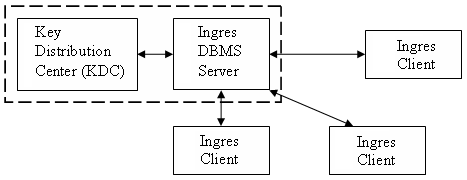
If enough resources are available, it is desirable to install the KDC on a network node separate from the Ingres installation. In this way, security restrictions can be imposed on the Kerberos node that may not be possible if Kerberos resided on the same machine as an Ingres DBMS:
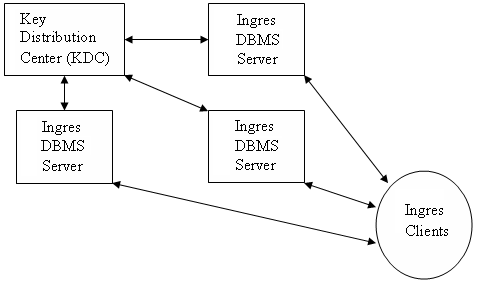
The example above demonstrates why Kerberos is sometimes referred to as "distributed authentication." The KDC performs authentication for all Ingres nodes in the enterprise, even though the KDC itself resides on a separate network node.
Note: The above example assumes all the Ingres nodes will use Kerberos for authentication, but this is not a requirement; some nodes may continue to use Ingres or System authentication.
|
|
|
Here are examples of Kerberos configuration files. These examples assume that the KDC resides on the node foo.xyz.com and the Kerberos domain is named MYDOMAIN.XYZ.COM,
The krb5.conf file may look like this:
[libdefaults]
default_realm = MYDOMAIN.XYZ.COM
[realms]
SSF.XYZ.COM = {
kdc = foo.xyz.com
admin_server = foo.xyz.com
}
[domain_realm]
.xyz.com = MYDOMAIN.XYZ.COM
xyz.com = MYDOMAIN.XYZ.COM
[logging]
kdc = FILE:/var/log/krb5kdc.log
admin_server = FILE:/var/log/kadmin.log
default = FILE:/var/log/krb5lib.log
The kdc.conf file may look like this:
[kdcdefaults]
kdc_ports = 88
[realms]
MYDOMAIN.XYZ.COM = {
kadmind_port = 749
max_life = 12h 0m 0s
max_renewable_life = 7d 0h 0m 0s
master_key_type = des3-hmac-sha1
supported_enctypes = des3-hmac-sha1:normal des-cbc-crc:normal des-cbc-crc:v4
}
|
|
|
A Kerberos principal is an entity to which credentials (validated tickets) may be assigned. Most principals of concern to Ingres are simply those that correspond to the login names of the Ingres users. For instance, for the domain MYDOMAIN.XYZ.COM, a principal representing the "ingres" user is "[email protected]".
Note: The credentials associated with the "ingres" user are valid for all "ingres" logins in the Kerberos domain, regardless of the system passwords associated with the "ingres" login name on each machine.
A KDC must define user principals for each Ingres user that exists in the enterprise, and for each Ingres service principal. An Ingres service principal does not correspond to a login user name. Instead, the Ingres service principal represents an Ingres process that performs authentication on behalf of the user.
User principals get tickets directly through the kinit or Leash Ticket Manager programs, but an Ingres service principal requires no such initialization. Instead, the Ingres service principal relies on the Kerberos keytab file to establish its credentials.
An Ingres service principal definition is required for each node on the Kerberos domain that has an Ingres installation. The KDC installation must define a keytab file for all Ingres service principals in order to decrypt tickets received from the KDC. A copy of the keytab file must be installed on each Ingres node in the Kerberos domain.
Windows installations using the Leash Kerberos Ticket Manager (client-only Kerberos) do not reference the keytab file by default. Instead, the Windows credential cache is referenced. For Windows installations, the environment variable KRB5_KTNAME must be defined as the full path and file name of the keytab file on the local Windows installation. Windows or other installations that execute a KDC must still download the keytab file of the KDC if the local KDC is not used for authentication.
The Ingres service principal uses the standard Kerberos "primary/instance@realm" format, as follows:
$ingres/hostname@realm
Is the fully qualified domain name of the host on which the Ingres installation is running.
Is the Kerberos administrative domain name.
In the example host name foo.xyz.com, the Ingres service principal would be named "$ingres/[email protected]".
Note: The fully-qualified host name is required when defining the Ingres service principal. Thus, the name "[email protected]" is not a valid Ingres service principal name.
|
|
|
The process for configuring Ingres to use Kerberos is as follows:
Note: It is not necessary to run the iisukerberos utility on Windows.
Startup will be successful if the Kerberos GSS API library exists in your LD_LIBRARY_PATH definition.
sql iidbdb
|
|
|
To configure Ingres to use Kerberos, you must set certain parameters in Configuration-By-Forms. In addition, connection attributes may be required depending on the requirements of the enterprise.
Note: Before configuring parameters, you must run the iisukerberos utility (except on Windows).
The following system components in Configuration-By-Forms are relevant:
|
|
|
The iisukerberos utility adds Kerberos to the list of Ingres-supported security mechanisms, so that you can configure Ingres to use Kerberos.
Note: It is not necessary to run the iisukerberos utility on Windows.
This command has the following format:
iisukerberos
|
|
|
When you configure Ingres to use Kerberos, you should first check the base configuration. The base configuration consists of the mechanisms parameter and the domain parameter in the Security component.
|
|
|
For Ingres to use Kerberos as a dynamic mechanism, the mechanism parameter must be set to kerberos. In Configuration-By-Forms, the mechanisms parameter is located in Security, Configure, System.
The setting should look similar to this:
Name |
Value |
Units |
|---|---|---|
mechanisms |
kerberos |
mechanism list |
Note: The ingres, system, or null mechanisms are invalid entries to this list, since its purpose is to specify the dynamic authentication mechanisms.
|
|
|
In addition to the mechanism parameter, the domain parameter is must be set to configure Ingres to use Kerberos.
In Configuration-By-Forms, the domain parameter is located in Security, Configure, System, Mechanisms, Kerberos.
The domain parameter must contain the fully qualified host name of the local installation. This name will correspond to the Ingres service principal name. For example, for machine foo.xyz.com, the value for the domain parameter should be "foo.xyz.com." If the entry reads simply "foo," edit and correct the entry.
The setting should look similar to this:
Name |
Value |
Units |
|---|---|---|
domain |
foo.xyz.com |
hostname |
|
|
|
The Name Server can be configured to use Kerberos for authentication for all remote targets. If so configured, connection attempts on non-Kerberos targets will fail. Use the remote_mechanism parameter for this purpose.
In Configuration-By-Forms, the remote_mechanism parameter is located in the Name Server component. Add kerberos to the mechanism list (if not already added in the Security configuration), and specify kerberos as the value on the remote_mechanism parameter.
The setting should look similar to this:
Name |
Value |
Units |
|---|---|---|
remote_mechanism |
kerberos |
none, default, mechansim name |
In a homogeneous Kerberos environment, it is not necessary to add login/password information for the vnode definitions in netutil. They are ignored at connect time.
|
|
|
Heterogeneous Kerberos environments are those in which both Kerberos and non-Kerberos connection targets exist in the enterprise. In such an environment, the Name Server settings must be left at their default values in Configuration-By-Forms: the local client behavior must change, depending on the connection target.
To configure the client in a heterogeneous Kerberos environment, specify connection attributes for a vnode using the netutil utility.
Here is a sample vnode configuration in netutil:
Connection data for vnode 'newyork' |
|||
|---|---|---|---|
Type |
Net Address |
Protocol |
Listen Address |
Global |
newyork-xp1. |
wintcp |
TS |
Other attribute data for vnode 'newyork' |
||
|---|---|---|
Type |
Attr_Name |
Attr_Value |
Private |
authentication_mechanism |
kerberos |
Note: The login/password entry for a Kerberos target should remain blank. A login/password entry is not required because the local Kerberos user principal is used for authentication, and the KDC authenticates using the ticket cache of the local user, rather than the system password on the remote connection target.
|
|
|
To specify encryption, the following options are available in Configuration-By-Forms under the Net Server (also known as Communications Server) component:
Determine the encryption mechanism for inbound connections. Valid values are
Specifies that Kerberos be used.
Specifies that Kerberos will be used if included as an item on the mechanism list.
Determine the encryption mechanism for outbound connections. Valid values are the same as for ib_encrypt_mech.
Determines the encryption mode for the inbound data stream. Valid values are as follows:
Specifies that encryption be neither requested nor allowed.
Specifies that encryption may occur but is not requested.
Specifies that encryption is requested, if possible (if both ends support it).
Specifies that encryption must always occur.
Determines the encryption mode for the outbound data stream. Valid values are the same as for ib_encrypt_mode.
Outbound connection items may be configured as connection attributes in netutil.
The following example specifies Kerberos encryption for all inbound connections:
Name |
Value |
Units |
|---|---|---|
ib_incrypt_mech |
kerberos |
*, mechanism name |
ib_incrypt_mode |
required |
off, optional, on, required |
|
|
|
Kerberos authentication can be extended to local connections.
To use Kerberos for local authentication
Name |
Value |
Units |
|---|---|---|
user_mechanism |
kerberos |
none, default, mechanism name |
Note: The security_mechanism or server_mechanism parameters are not valid for Kerberos. Attempts to set these to kerberos will return errors.
|
|
|
Delegation provides an alternate method of acquiring and forwarding authentication. When delegation is configured, the Name Server generates authentication certificates as if it were the client.
This method requires Kerberos to be configured as both the local and remote authentication mechanism. The client process generates an authentication certificate for the local Name Server. The local Name Server, in turn, uses its delegation capabilities to generate an authentication certificate, and forwards the certificate on behalf of the client to the remote Name Server.
If delegation is not enabled, or Kerberos is not configured as the local authentication mechanism, then the Name Server cannot generate the remote authentication certificate. Instead, the client acquires the authentication certificate prior to making the remote connection. The client then forwards the credentials directly to the remote Name Server. Either method is valid for making secure connections through Kerberos.
|
|
|
The process of acquiring and forwarding authentication can be delegated to the Name Server.
To set delegation