

This chapter describes the use of spatial data types in SQL statements. It also describes spatial operators and functions.
|
|
|
The Ingres Spatial Object Library provides spatial data types that enable you to manipulate spatial data using Ingres. Although spatial data types represent data that is more complex than the basic SQL data types, you can use them in any appropriate context within an SQL statement.
Spatial operators and functions enable you to perform complex operations on spatial data stored in tables.
|
|
|
The Spatial Object Library contains the following data types:
In addition, there are integer variations of these data types:
Finally, there is another data type that is used in rtree index processing: nbr (normalized bounding region).
|
|
|
The point data type consists of an x and a y coordinate value. Each coordinate value is specified using a floating point number (float8). The point data type is the major component of the other spatial data types. The format of the float literal in the point data type is as follows:
<x:b1>d.dddddddddddddddE+eee
with 16-decimal digit precision and a 3-digit exponent. This enables the point data type to support Ingres float representation (-1.0e-38 to +1.0e+38 with 16-digit precision). If your hardware supports the IEEE standard for floating point numbers, the float type is accurate to 15-decimal precision and ranges from -10**308 to +10**308.
The point data type is specified using two floats:
(x_value, y_value)
For example:
(3,4)
The following example creates and populates a table with point values. Points can be real or integer values.
create table point_table (id char(2), obj point);
insert into point_table values ('AA','(1,1)');
insert into point_table values ('BA','(0.0, 12.237)');
insert into point_table values ('GH','(1603452, -20321)');
|
|
|
A box is defined as a rectangle whose sides are parallel to the coordinate system axis. Boxes do not have to be square. The box data type is specified as two points:
The string representation of the box data type is:
(lower_left_point, upper_right_point)
For example:
((1,2.25), (5,6))
All boxes must contain two different points. Identical points generate a box with both a width and height of zero.
The following example creates and populates a table with boxes.
create table box_table (id char(2), obj box);
insert into box_table values ('A', '((0,0), (2, 2)) ');
insert into box_table values ('B', '((-40.345, -40.123), (4.0, 4.0))');
insert into box_table values ('I', '((-160, -660), (60,60))');
|
|
|
The lseg (line segment) data type contains two parts:
The string representation of the lseg data type is:
(begin_point, end_point)
For example:
((1,2), (3.46,-4.0))
The begin and end points of the line segment cannot be identical. Identical points generate a zero length for the line segment.
The following example creates and populates a table with lseg attributes.
create table lseg_table (id char(2), obj lseg);
insert into lseg_table values ('A', '((0,0), (1,2))');
insert into lseg_table values ('B', '((120,160), (60,160))');
insert into lseg_table values ('I', '((-160,-660), (60,60))');
|
|
|
The line data type contains two parts:
The npoints field is a 4-byte integer containing the number of points in the points array. The points array is an array of the point data type. Each array entry contains 16 bytes (an x and a y float value).
Line literals are specified as list of points. For example:
((1,2), (3,4), (5,6), (6,6), (7,9))
Each (x,y) pair must conform to the literal representation of the point data type. All lines must contain at least two points.
Tables are divided into 2048 byte pages. Of this total, 2000 bytes are available for data storages. This limits the total number of points available for the line (and polygon) data structure. Each point in the line requires 16 bytes.
Windows and UNIX: The npoints field is padded to 8 bytes.
Because the maximum row size is 2000, and 8 + 124*16 = 1992, the maximum user-specified line size is 124 points. If the line size is 125, the row size is 2008, which is too big. The row cannot exceed the page boundary.
When you create line columns in tables, you specify the maximum number of points in the line (for example, line(10)). If shorter lines are inserted into the column, the same amount of storage space is consumed as for lines of the maximum (declared) size.
The following example creates and populates a table with line values.
create table line_table (id char(2), obj line(3));
insert into line_table values ('A', '((0,0), (1,1), (1,2)) ');
insert into line_table values ('B', '((60, 180), (120, 180), (90,130))');
insert into line_table values('C','((120,160),(60,160))');
|
|
|
The long line data type has the same characteristics as the line data type, but can accommodate up to 2G (gigabytes) of data (approximately 100 million points). Long line data is stored in one or more 2048-byte segments. Each segment contains an integer indicating the number of points in the segment, followed by an array of points specified as pairs of 8-byte floating point values.
The long line data type can be inserted into and selected from tables using the varchar or long varchar data type-for details, see the SQL Reference Guide.
The long line data type is subject to the following restrictions:
The following example creates a table with a long line column and inserts rows into it. Note that the long line column specification in the create table statement omits a length specifier.
create table long_line_table (id char(2), obj long line);
insert into long_line_table values ('A', '((0,0), (1,1),
(1,2), (60, 180), (120, 180), (90,130), (120,160), (60,160))');
|
|
|
The polygon data type contains two parts:
The npoints part is a long integer containing the number of points in the points array. The polygon data type is identical to the line data type, except that polygon data type implies closure. The string representation of the polygon data type is a list of points:
((x1,y1), (x2,y2), (x3,y3),..., (xN,yN))
For example:
((1,2), (3,4), (5,6), (6,6), (8,3))
Each (x,y) pair conforms to the string representation of the point data type. All polygons must have a non-zero area, must not be self-intersecting, and must not contain duplicate points. A polygon data type can be either concave or convex.
Windows and UNIX: The npoints field is padded to 8 bytes.
The polygon data type contains a 4-byte integer npoints field and an array of a variable number of points. Because the maximum row size is 2000, and 8 + 124*16 = 1992, the maximum number of vertices is 124 and the minimum number of vertices is 3 (at least 3 points are required to form a polygon).
When you create polygon columns, you specify the maximum number of points in the polygon-for example, "mypoly polygon(11)". Every polygon you insert into the table consumes the maximum space required for a polygon of the declared length, even if the polygon has fewer points than the column can accommodate.
The following example creates and populates a table with polygon attributes.
create table polygon_table (id char(2), obj polygon(3));
insert into polygon_table values ('Z','((0,0),(2,1),(1,2)) ');
insert into poly_table values ('A', '((-20, -20), (-20, 20), (20,20))');
insert into poly_table values ('B', '((-40, -40), (-40, 40), (40,40))');
insert into poly_table values ('C', '((-60, -60), (-60, 60), (60,60))');
|
|
|
The long polygon data type has the same characteristics as the polygon data type, but can accommodate up to 2G (gigabytes) of data (approximately 100 million points). Long polygon data is stored in one or more 2048-byte segments. Each segment contains an integer indicating the number of points in the segment, followed by an array of points specified as pairs of 8-byte floating point values.
The long polygon data type can be inserted into and selected from tables using the varchar or long varchar data type-for details, see the SQL Reference Guide.
The long polygon data type is subject to the following restrictions:
The following example creates a table with a long polygon column and inserts rows into it. Note that the long polygon column specification in the create table statement omits a length specifier.
create table long_poly_table (id char(2), obj long polygon);
insert into long_poly_table values ('Z', '((0,1), (1,1),
(1,2), (160, 280), (220, 340), (190,930), (120,260), (60,160))');
|
|
|
The circle data type is composed of two parts:
The center point is of type point. The radius is a floating point number (double). The literal representation of the circle data type is:
(center_point, radius)
For example:
((1.25,4.32), 5.1)
The following example creates a table with a circle column and inserts rows.
create table circle_table (id char(2), obj circle);
insert into circle_table values ('S', '((1,1),1)');
insert into circle_table values ('A', '((0, 0),20)');
insert into circle_table values ('B','((0, 0),40)');
insert into circle_table values ('C','((0,0),60)');
|
|
|
The ipoint data type consists of an x and a y coordinate value. Each coordinate value is specified using an integer number (integer4). The ipoint data type is the major component of the other spatial data types. The format of the integer literal in the ipoint data type is as follows:
<x:b1>dddddddddd
with 10-digit precision. This enables the ipoint data type to support Ingres integer representation (-2,147,483,648 to +2,147,483,647).
The ipoint data type is specified using two integers:
(x_value, y_value)
For example:
(3, 4)
The following example creates and populates a table with ipoint values. Ipoints can only be integer values.
create table ipoint_table (id char(2), obj ipoint);
insert into ipoint_table values ('AA','(1,1)');
insert into ipoint_table values ('BB','(4233, 133333)');
insert into ipoint_table values ('CC','(1603452, -20321)');
|
|
|
An ibox is a box of ipoints.
An ibox is defined as a rectangle whose sides are parallel to the coordinate system axis. Iboxes do not have to be square. The ibox data type is specified as two points:
The string representation of the ibox data type is:
(lower_left_point, upper_right_point)
For example:
((1,2), (5,6))
All iboxes must contain two different points, because identical points generate a box with both a width and height of zero.
The following example creates and populates a table with iboxes.
create table ibox_table (id char(2), obj ibox);
insert into ibox_table values ('A', '((0,0), (2, 2)) ');
insert into ibox_table values ('B', '((-40, -40), (4, 4))');
insert into ibox_table values ('I', '((-160, -160), (60,60))');
|
|
|
An ilseg is an lseg of ipoints.
The ilseg (integer line segment) data type contains two parts:
The string representation of the ilseg data type is:
(begin_point, end_point)
For example:
((1,2), (3,4))
The begin and end points of the line segment cannot be identical, because identical ipoints generate a zero length for the integer line segment.
The following example creates and populates a table with ilseg values.
create table ilseg_table (id char(2), obj ilseg);
insert into ilseg_table values ('A', '((0,0), (1,2))');
into liseg_table values ('B', '((120,160), (60,160))');
insert into ilseg_table values ('I', '((-160,-660), (60,60))');
|
|
|
An iline is a line of ipoints.
The iline data type contains two parts:
The npoints field is a 4-byte integer containing the number of ipoints in the ipoints array. The ipoints array is an array of the ipoint data type. Each array entry is 8 bytes (an x and a y integer value).
Iline literals are specified as list of ipoints, for example:
((1, 2), (3, 4), (5, 6), (6, 6), (7, 9))
Each (x,y) pair must conform to the literal representation of the ipoint data type. All ilines must contain at least two points, must not be self-intersecting, and must not contain duplicate points.
Columns are limited to 2000 bytes in Ingres. This limits the total number of ipoints available for the iline (and ipolygon) data structure. Each ipoint in the iline requires 8 bytes.
For example, a table with an iline column defined as "iline(10)" requires 84 bytes:
iline(10) = 4 bytes (npoints) + 10*8 bytes (ipoints array) = 84 bytes
Because the maximum column size is 2000, and 4+ 249*8 = 1992, the maximum user-specified iline size is 249 ipoints. If the iline size is 250, the row size is 2004, which is too big. The row cannot exceed the column boundary.
When you create iline columns in tables, you specify the maximum number of ipoints in the iline (for example, iline(10)). If shorter lines are inserted into the column, the same amount of storage space is consumed as for lines of the maximum (declared) size. If the table is compressed, the actual storage consumed by iline(10) with 3 points is less than with 4 or more points.
The following example creates and populates a table with iline values.
create table iline_table (id char(2), obj iline(3));
insert into iline_table values ('A', '((0,0), (1,1), (1,2))');
insert into iline_table values ('B', '((60,180), (120,180),
(90,130))');
insert into iline_table values('C','((120,160), (60,160))');
|
|
|
An ipolygon is a polygon of ipoints.
The ipolygon data type contains two parts:
The npoints part is a 4-byte integer containing the number of ipoints in the ipoints array. The ipolygon data type is identical to the iline data type, except that ipolygon data type implies closure. The string representation of the ipolygon data type is a list of points:
((x1,y1), (x2,y2), (x3,y3),..., (xN,yN))
For example:
((1,2), (3,4), (5,6), (6,6), (8,3))
Each (x,y) pair conforms to the string representation of the ipoint data type. All ipolygons must have a non-zero area, must not be self-intersecting, and must not contain duplicate points. An ipolygon data type can be either concave or convex.
Each ipoint in the ipolygon requires 8 bytes. For example, a table created with an ipolygon defined as "ipolygon(11)" requires 92 bytes:
ipolygon(11) = 4 bytes (for npoints) + 11*8 bytes (points array) = 92 bytes
The ipolygon data type contains a 4-byte integer npoints field and an array of a variable number of ipoints. Because the maximum row size is 2000, and 4 + 249*8 = 1996, the maximum number of vertices is 249 and the minimum number of vertices is three (at least three points are required to form a polygon).
When you create ipolygon columns, you specify the maximum number of points in the ipolygon-for example, "myipoly ipolygon(11)". Every ipolygon you insert into the table consumes the maximum space required for a ipolygon of the declared length, even if the ipolygon has fewer points than the column can accommodate. If the table is compressed, the actual storage consumed by ipolygon(11) with 3 points is less than with 4 or more points.
The following example creates and populates a table with ipolygon attributes.
create table ipolygon_table (id char(2), obj ipolygon(3));
insert into ipolygon_table values ('Z', '((0,0), (2,1), (1,2))');
insert into ipoly_table values ('A', '((-20, -20), (-20, 20,
(20,20))');
insert into ipoly_table values ('B', '((-40, -40), (-40, 40)
(40,40))');
insert into ipoly_table values ('C', '((-60, -60), (-60, 60),
(60,60))');
|
|
|
An icircle is a circle with an ipoint center and an integer radius.
The icircle data type is composed of two parts:
The center point is of type ipoint. The radius is a 4-byte number. The literal representation of the icircle data type is:
(center_point, radius)
For example:
((1,2), 5)
The following example creates a table with an icircle column and inserts rows.
create table icircle_table (id char(2), obj icircle);
insert into icircle_table values ('S', '((1,1), 1)');
insert into icircle_table values ('A', '((0,0), 20)');
insert into icircle_table values ('B', '((0,0), 40)');
insert into icircle_table values ('C', '((0,0), 60)');
|
|
|
An nbr is similar to an ibox. It is comprised of four 3-byte integers in a lower-left and upper-right arrangement like a box or an ibox. However, an nbr can have the same lower-left and upper-right coordinates, like a point has, or the same x or y coordinates, like a line has.
An nbr is defined as a rectangle whose sides are parallel to the coordinate system axis. Further, the nbr is normalized within a coordinate system. The nbr coordinate values are normalized to values from (0,0). An nbr cannot be specified; it must be derived from a spatial object and a range, for example, nbr(object,range). The range is either a box or an ibox. The range describes the entire region that contains all objects. In other words, the range is the smallest x, y values as the lower-left corner, and the largest x, y as the upper-right corner. For instance, the range of latitude and longitude is ((-180,-90),(180,90)).
|
|
|
Spatial data is stored as shown in the following table:
Notation |
Storage Format |
Range |
|---|---|---|
point |
2 8-byte floats |
-1.0e+38 to +1.0e+38 |
lseg |
2 points (begin_point, end_point) |
-1.0e+38 to +1.0e+38 |
line |
1 integer 1 array of points |
(2-124) -1.0e+38 to +1.0e+38 |
box |
2 points (lower_left, upper_right) |
-1.0e+38 to +1.0e+38 |
polygon |
1 integer 1 array of points |
(3-124) -1.0e+38 to +1.0e+38 |
circle |
1 point (center_point) 1 float (radius) |
-1.0e+38 to +1.0e+38 same as float (must have a value > 0.0) |
ipoint |
2 4-byte integers |
-2,147,483,648 to +2,147,483,647 |
ilseg |
2 ipoints (begin_point, end_point) |
-2,147,483,648 to +2,147,483,647 |
iline |
1 4-byte integer 1 array of ipoints |
2 to 249 -2,147,483,648 to +2,147,483,647 |
ibox |
2 ipoints (lower_left, upper_right) |
-2,147,483,648 to +2,147,483,647 |
ipolygon |
1 4-byte integer 1 array of points |
3 to 249 -2,147,483,648 to +2,147,483,647 |
icircle |
1 ipoint (center_point) 1 4-byte integer (radius) |
-2,147,483,648 to +2,147,483,647 1 to +2,147,483,647 |
nbr |
4 3-byte integers |
1 to +16,777,215 |
Note: If your hardware supports the IEEE standard for floating point numbers, the float type is accurate to 15-decimal precision and ranges from -10**308 to +10**308. This also applies to the spatial data types.
|
|
|
Spatial operators let you perform complex operations on spatial data stored in tables. The spatial operators that can be used with spatial data types are as follows:
|
|
|
The equality operator (=) compares the internal representation of two operands and determines whether they represent identical values. This operator is valid only when comparing operands of the same type. You cannot compare a box to a polygon, for example.
You can also compare spatial data types for inequality, using the "<>" (not equal to) comparison operator. All comparisons are performed on a point-by-point basis (except for the circle data type), and similar but unequal operands fail this test. For example, when testing line segments:
((1,2), (3,4)) <> ((3,4), (1,2))
|
|
|
There are three binary spatial operators:
Inside–Determines whether an object of a particular data type is inside another spatial object
Intersects–Determines whether an object of a particular data type intersects another spatial object
Overlaps–Determines whether two spatial data objects have any points in common
Prefix and postfix notation is supported for these operators. The prefix notation for these operators is "operator(operand1, operand2)". By contrast, the comparison (==, <>, >, <, <=, >=) and logical (and, or, not) operators support infix notation, which is not available for binary spatial operators.
|
|
|
The inside spatial operators determine whether one operand is contained within the boundary of another operand, as shown in the following example, where B is inside A:
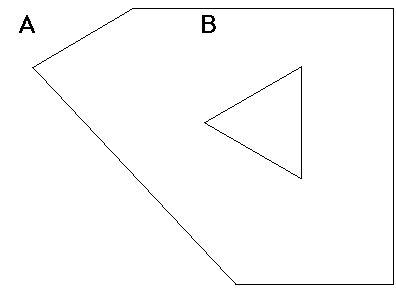
An operand that shares a line segment, a portion of a line segment, or even a single point with another operand (congruency) and meets the other qualifications for inside, satisfies the definition of inside. Boundaries, therefore, are considered to be inside.
If the result of inside is true, the inside operator returns a value of 1, otherwise it returns a value of 0. Prefix and postfix notation is supported, so the inside operator is defined as:
inside (spat_type1, spat_type2) = 1
or:
spat_type1 inside spat_type2
The following table shows the combinations of spatial data types for which inside spatial operators are supported:
|
point |
box |
lseg |
line and long line |
polygon and long polygon |
circle |
|---|---|---|---|---|---|---|
point |
N |
Y |
N |
N |
Y |
Y |
box |
N |
Y |
N |
N |
Y |
Y |
lseg |
N |
Y |
N |
N |
Y |
Y |
line and long line |
N |
Y |
N |
N |
Y |
Y |
polygon and long polygon |
N |
Y |
N |
N |
Y |
Y |
circle |
N |
Y |
N |
N |
Y |
Y |
|
|
|
The intersects spatial operator determines whether one operand intersects one or more points or edges (boundaries) of another operand. In the following illustration, B intersects A, C intersects A, and D intersects A:
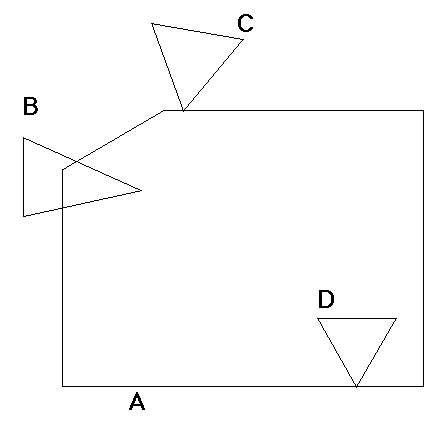
If the result of intersects is true, the intersects operator returns a value of 1; otherwise the value returned is zero.
Prefix and postfix notation is supported-the intersects operator is specified as follows:
intersects (spat_type1, spat_type2) = 1
or:
spat_type1 intersects spat_type2
You can use the intersects operator with all of the spatial data types.
|
|
|
The overlaps spatial operator determines whether on operand is wholly contained within the boundary of another operand or if one operand intersects one or more points or edges of another spatial object. Hence, object A overlaps object B if there are any common points between A and B. In the following illustration, B overlaps A, C overlaps A, D overlaps A, and E overlaps A:
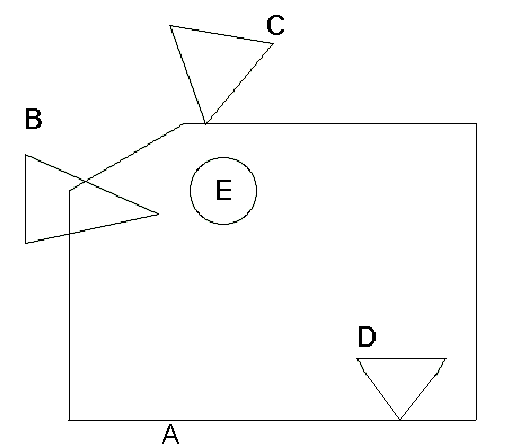
Note that B, C, and D both overlap and intersect A, however, E, which is wholly contained in A, only overlaps A.
If the result of overlaps is true, the overlaps operator returns a value of 1; otherwise the value returned is zero.
Prefix and postfix notation is supported-the overlaps function can be specified as follows:
overlaps (spat_type1, spat_type2) = 1
or:
spat_type1 overlaps spat_type2
You can use the overlaps function with all of the spatial data types.
|
|
|
The nbr spatial function produces an nbr data type from a spatial object and a box or an ibox. The box or ibox specifies the range of values that the object can take on. The nbr is a normalized bounding region for the object. The nbr can be thought of as a concise bounding box. Note that bbox(point) is not supported, but an nbr(point,box) is supported.
The nbr result is a pair of two 3-byte coordinates, for a total of 12 bytes. It is stored in lower-left x, y and upper-right x, y sequence, similar to a box.
The nbr is used by the hilbert function:
nbr_typ1 = nbr (spat_type, box_of_range_type1)
You can use the nbr function with all the spatial data types. The range must be specified as a box or an ibox.
|
|
|
The hilbert spatial function produces a 6-byte field from an nbr. The hilbert value has the property that objects with close hilbert values are spatially close in the database. However, it is possible to find two spatially close objects that have very different hilbert numbers. With the hilbert value you can spatially cluster tables for better performing spatial queries and spatial joins by storing the rows in hilbert sequence.
Hilbert values are not unique; it is possible for two close spatial objects to generate the same hilbert value.
The hilbert result is a 6-byte binary value:
hilbert_value = hilbert (nbr_type1)
This can be used with the nbr and box functions:
hilbert_value = hilbert ( nbr(spat_type1, box(range_type1)) )
|
|
|
Spatial functions let you perform complex operations on spatial data stored in tables. There are three types of functions that support the spatial operators:
|
|
|
You can use the spatial functions to perform calculations on the spatial data types. These functions all return floating point (double) values as a result. There are four spatial functions:
Area–calculates the area of a box, circle, polygon, long polygon, ibox, icircle, or ipolygon
Length–calculates the length of a line, long line, lseg, iline, or ilseg
Perimeter–calculates the perimeter of a box, circle, polygon, long polygon, ibox, icircle, or ipolygon
Distance–calculates the distance between two points or two ipoints
The distance function differs from the other functions because it requires two operands (points) as arguments.
|
|
|
The four spatial conversion functions accept a spatial data type and return either a point value or a floating point (double) value corresponding to either the x or y value of the point. These functions are:
The box_ll and box_ur functions each accept a box data type as input and return a point value corresponding to either the lower-left or upper-right corner point. Similarly, these functions also accept an ibox and return an ipoint value. The following table lists the explicit type conversion functions available for the spatial data types:
Name |
First |
Second Operand |
Result |
Description |
|---|---|---|---|---|
bbox |
lseg |
|
box |
Converts any of the defined operands to internal box representation. Bounding box limits are defined as the minimum and maximum values found in any x,y data pair in the data type being converted. |
bbox |
iline |
|
ibox |
Converts any of the defined operands to internal ibox representation. |
box |
char |
|
box |
Converts a char or varchar string to internal box representation. |
box |
ibox |
|
box |
Converts an ibox to a box. |
box |
point |
point |
box |
Converts two points to an internal box representation. |
box_ll |
ibox |
|
ipoint |
Returns the lower-left coordinate of an ibox. |
box_ur |
ibox |
|
ipoint |
Returns the upper-right coordinate of an ibox. |
box_ll |
box |
|
point |
Returns the lower-left coordinate of a box. |
box_ur |
box |
|
point |
Returns the upper-right coordinate of a box. |
char |
point |
|
char |
Converts the spatial data type to its character representation. |
circle |
char |
|
circle |
Converts a char or varchar string to internal circle representation. |
circle |
icircle |
|
circle |
Converts an icircle to a circle. |
circle |
point |
float |
circle |
Converts a point and a float to an internal circle representation. |
hilbert |
nbr |
|
varbyte |
Calculates the hilbert value for an nbr. The hilbert is half as long as the nbr. |
ibox |
char |
|
ibox |
Converts a char or varchar string to internal ibox representation. |
ibox |
ipoint |
ipoint |
ibox |
Converts two ipoints to an internal ibox representation. |
icircle |
char |
|
icircle |
Converts a char or varchar string to internal icircle representation. |
icircle |
ipoint |
integer |
icircle |
Converts an ipoint and an integer to an internal icircle representation. |
iline |
char |
|
iline |
Converts a char or varchar string to an internal iline representation. |
ilseg |
char |
|
ilseg |
Converts a char or varchar string to an internal ilseg representation. |
ilseg |
ipoint |
ipoint |
ilseg |
Converts two ipoints to an internal ilseg representation. |
ipoint |
char |
|
ipoint |
Converts a char or varchar string to internal ipoint representation. |
ipoint |
integer |
integer |
ipoint |
Converts two integers to an internal ipoint representation. |
ipolygon |
char |
|
ipolygon |
Converts a char or varchar string to internal ipolygon representation. |
line |
char |
|
line |
Converts a char or varchar string to internal line representation. |
long_line |
char |
|
long line |
Converts a char or varchar string to internal long line representation. |
long_ polygon |
char |
|
line |
Converts a char or varchar string to internal long polygon representation. |
lseg |
char |
|
lseg |
Converts a char or varchar string to internal lseg representation. |
lseg |
ilseg |
|
lseg |
Converts an ilseg to an lseg. |
lseg |
point |
point |
lseg |
Converts two points to an internal lseg representation. |
nbr |
point |
box |
nbr |
Converts a spatial data type with a range specified by a box or an ibox to an internal nbr representation. The nbr function supports the integer spatial types only when the second parameter is ibox and float spatial types only when the second parameter is box. |
point |
char |
|
point |
Converts a char or varchar string to internal point representation. |
point |
float |
float |
point |
Converts two floats to an internal point representation. |
point_x |
ipoint |
|
integer |
Returns the x coordinate of an ipoint. |
point_y |
ipoint |
|
integer |
Returns the y coordinate of an ipoint. |
polygon |
char |
|
polygon |
Converts a char or varchar string to internal polygon representation. |
varbyte |
point |
|
varbyte |
Copies a spatial data type in its binary form to a varbyte representation. |
varchar |
point |
|
varchar |
Converts a spatial data type to its character representation in varchar form. |
|
|
|
The routines in the following tables can be used with the spatial data types to perform an explicit type conversion between SQL data types and spatial data types. Each routine returns a zero for success and a non-zero value for failure.
To call these routines you must include the following files in your source code:
The following table describes the support routines for all the spatial data types:
Routine Name and Description |
Inputs |
Outputs |
Implementation |
|---|---|---|---|
POINT_TO_CHAR Converts point data types to character representation. |
Pointer to a point Pointer to a 2000 char buffer |
Buffer filled with null-terminated character representation of a point |
int POINT_TO_CHAR (POINT *pnt, char*buf) |
CHAR_TO_POINT Converts character string to point data type. |
Pointer to null-terminated character string Pointer to point to be filled |
Point variable filled with point value |
int CHAR_TO_POINT (char*str, POINT*pnt) |
BOX_TO_CHAR Converts box data type to character representation. |
Pointer to a box Pointer to a 2000 char buffer |
Buffer filled with null-terminated character representation of box |
int BOX_TO_CHAR |
CHAR_TO_BOX Converts character string to box data type. |
Pointer to null-terminated character string Pointer to box to be filled |
Box variable filled with box value |
int CHAR_TO_BOX |
LSEG_TO_CHAR Converts lseg data type to character representation. |
Pointer to an lseg Pointer to a 2000 char buffer |
Buffer filled with null-terminated |
int LSEG_TO_CHAR |
CHAR_TO_LSEG Converts character string to lseg data type. |
Pointer to null-terminated character string Pointer to lseg to be filled |
Lseg variable filled with lseg value |
int CHAR_TO_LSEG |
LINE_TO_CHAR Converts line data type to character representation. |
Pointer to a line Pointer to a 2000 char buffer |
Buffer filled with null-terminated character representation of line |
int LINE_TO_CHAR |
CHAR_TO_LINE Converts character string to line data type. |
Pointer to null-terminated character string Pointer to line to be filled maximum number of points in line |
Line variable filled with line points |
int CHAR_TO_LINE |
POLYGON_TO_CHAR Converts polygon data type to character representation. |
Pointer to a polygon Pointer to a 2000 char buffer |
Buffer filled with null- terminated character representation of polygon |
int POLYGON_TO_CHAR |
CHAR_TO_POLYGON Converts character string to polygon data type. |
Pointer to null-terminated character string Pointer to polygon to be filled Maximum number of points in polygon |
Polygon variable filled with polygon vertices |
int CHAR_TO_POLYGON |
CIRCLE_TO_CHAR Converts circle data type to character representation. |
Pointer to a circle Pointer to a 2000 char buffer |
Buffer filled with null-terminated character representation of circle |
int CIRCLE_TO_CHAR |
CHAR_TO_CIRCLE Converts character string to circle data type. |
Pointer to null-terminated character string Pointer to circle to be filled |
Circle variable filled with circle value |
int CHAR_TO_CIRCLE |
IPOINT_TO_CHAR Converts ipoint data types to character representation. |
Pointer to a ipoint Pointer to a 2000 char buffer |
Buffer filled with null-terminated character representation of an ipoint |
int IPOINT_TO_CHAR (IPOINT* ipnt, char* buf) |
CHAR_TO_IPOINT Converts character string to ipoint data type. |
Pointer to null-terminated character string Pointer to ipoint to be filled |
Point variable filled with ipoint value |
int CHAR_TO_IPOINT (char* str, IPOINT* ipnt) |
IBOX_TO_CHAR Converts ibox data type to character representation. |
Pointer to an ibox Pointer to a 2000 char buffer |
Buffer filled with null-terminated character representation of ibox |
int IBOX_TO_CHAR |
CHAR_TO_IBOX Converts a character string to ibox data type. |
Pointer to null-terminated character string Pointer to ibox to be filled |
Box variable filled with ibox value |
int CHAR_TO_IBOX |
ILSEG_TO_CHAR Converts lseg data type to character representation. |
Pointer to an ilseg Pointer to a 2000 char buffer |
Buffer filled with null-terminated character representation of ilseg |
int ILSEG_TO_CHAR |
CHAR_TO_ILSEG Converts a character string to ilseg data type. |
Pointer to null-terminated character string Pointer to ilseg to be filled |
Ilseg variable filled with lseg value |
int CHAR_TO_ILSEG |
ILINE_TO_CHAR Converts iline data type to character representation. |
Pointer to an iline Pointer to a 2000 char buffer |
Buffer filled with null-terminated character representation of iline |
int ILINE_TO_CHAR |
CHAR_TO_ILINE Converts a character string to iline data type. |
Pointer to null-terminated character string Pointer to iline to be filled maximum number of points in iline |
Line variable filled with iline points |
int CHAR_TO_ILINE |
IPOLYGON_TO_CHAR Converts ipolygon data type to character representation. |
Pointer to an ipolygon Pointer to a 2000 char buffer |
Buffer filled with null-terminated character representation of ipolygon |
int IPOLYGON_TO_CHAR |
CHAR_TO_IPOLYGON Converts character string to ipolygon data type. |
Pointer to null-terminated character string Pointer to ipolygon to be filled Maximum number of points in ipolygon |
Ipolygon variable filled with ipolygon vertices |
int CHAR_TO_IPOLYGON |
ICIRCLE_TO_CHAR Converts icircle data type to character representation. |
Pointer to a icircle Pointer to a 2000 char buffer |
Buffer filled with null-terminated character representation of icircle |
int ICIRCLE_TO_CHAR |
CHAR_TO_ICIRCLE Converts character string to icircle data type. |
Pointer to null-terminated character string Pointer to icircle to be filled |
Circle variable filled with icircle value |
int CHAR_TO_ICIRCLE |
|
|
|
You can specify spatial data type columns in the order by clause of select statements, and as key columns in create index statements. However, the order in which spatial data is returned (as the result of a query) is not guaranteed to have any particular geometric meaning.
|
|
|
Polygon, line, ipolygon, and iline columns can contain a variable number of points or ipoints. Ipoints are stored as two 4-byte integer values, whereas points are stored as two 8-byte floating point values.
The number of points that can be stored in a column is limited to 2000.
The maximum number of ipoints that can be stored in an ipolygon or an iline is 249. The maximum number of points that can be stored in a polygon or line is 124.
|
|
|
The spatial object package is provided as a separate distribution on UNIX. You must install the spatial package.
Before you can use spatial data types in your applications, you must relink the server. To link the server, use the iilink utility.
Follow these steps to install the package and relink the server:
ingstop
$ export II_DISTRIBUTION=ingres2006-spatial-9.1.0-123-sun-solaris-sparc-32-64bit.tar
tar xvf $II_DISTRIBUTION install
ingbuild
The spatial data types library is installed on your system.
iilink
The iilink utility enables you to link in spatial data types or other user-defined data types. You can specify an extension for the file name of the server created by iilink so that the existing server file (iimerge) is not overwritten.
You can now use spatial data types.
The following example illustrates the process of linking the DBMS Server to include spatial data types:
$ iilink
Loading INGRES merged server program ...
-----------------------------------------------------------------------
| INGRES Spatial Objects consist of six spatial data types: POINT, BOX |
| LINE, LINE SEGMENT, CIRCLE and POLYGON, as well as a number of |
| spatial operators that operate on these spatial data types. INGRES |
| Spatial Objects is licensed as an optional feature. If you have |
| purchased this option, answer yes; otherwise, press RETURN to |
| continue. |
-----------------------------------------------------------------------
Enter "yes" to load INGRES Spatial Objects, or press RETURN to continue: yes
-----------------------------------------------------------------------
| |
| These INGRES binaries are loaded to allow you to add User Defined |
| Data Types (UDTs) to this INGRES installation. |
| |
| You should now enter the modules where your User Defined Data Types |
| are defined. You can either enter the name of an object file(s) |
| or the name of a library. |
| Examples are: |
| /project1/obj/*.o |
| /project1/obj/filename.o |
| /project1/lib/myuadt.a |
| $II_SYSTEM/ingres/demo/udadts/libdemoudt.1.so |
| |
| If you don't have any User Defined Data Types created, press RETURN, |
| and the default object file will be used to load the INGRES binaries. |
| |
-----------------------------------------------------------------------
Enter the full pathname of the object file or library to be loaded,
or press RETURN for the default object file:
-----------------------------------------------------------------------
| |
| An extension may be supplied at this time to differentiate your test |
| binaries from the existing ones. |
| |
| For example, if you enter the extension "test", the DBMS binary is |
| created at: |
| |
| $II_SYSTEM/ingres/bin/iimerge.test |
| |
| Otherwise, the DBMS binary is created at: |
| |
| $II_SYSTEM/ingres/bin/iimerge |
| |
| where it overrides the existing DBMS binary. |
| |
-----------------------------------------------------------------------
Enter the file extension for the test binaries:
Loading iimerge ...
Done loading iimerge:
-rwsr-xr-x 1 ingres ingres 11857068 Mar 6 15:41
/devsrc/ingres2006r2/b119/install/test32/ingres/bin/iimerge
Creating links to iimerge...
/devsrc/ingres2006r2/b119/install/test32/ingres/bin/cacheutil linked to iimerge
/devsrc/ingres2006r2/b119/install/test32/ingres/bin/dmfacp linked to iimerge
/devsrc/ingres2006r2/b119/install/test32/ingres/bin/dmfjsp linked to iimerge
/devsrc/ingres2006r2/b119/install/test32/ingres/bin/dmfrcp linked to iimerge
/devsrc/ingres2006r2/b119/install/test32/ingres/bin/iidbms linked to iimerge
/devsrc/ingres2006r2/b119/install/test32/ingres/bin/iishowres linked to iimerge
/devsrc/ingres2006r2/b119/install/test32/ingres/bin/iistar linked to iimerge
/devsrc/ingres2006r2/b119/install/test32/ingres/bin/lartool linked to iimerge
/devsrc/ingres2006r2/b119/install/test32/ingres/bin/lockstat linked to iimerge
/devsrc/ingres2006r2/b119/install/test32/ingres/bin/logdump linked to iimerge
/devsrc/ingres2006r2/b119/install/test32/ingres/bin/logstat linked to iimerge
/devsrc/ingres2006r2/b119/install/test32/ingres/bin/rcpconfig linked to iimerge
/devsrc/ingres2006r2/b119/install/test32/ingres/bin/rcpstat linked to iimerge
/devsrc/ingres2006r2/b119/install/test32/ingres/bin/repstat linked to iimerge
Links to iimerge have been created.
|
|
|
Ingres processes access the spatial objects and user-defined data types by means of shared images. The entry point is the routine IIudadt_register() for user-defined data types and IIclsadt_register() for Ingres spatial objects. Installing user-defined data types or Ingres spatial objects requires:
Ingres provides the template command files for building the shared image for use in a test and production installation. The templates are located in:
II_SYSTEM:[INGRES.LIBRARY]II_USERADT_BUILD.COM
II_SYSTEM:[INGRES.LIBRARY]II_CLSADT_BUILD.COM
II_SYSTEM:[INGRES.LIBRARY]II_ALLADT_BUILD.COM
Note: II_CLSADT_BUILD.COM and II_ALLADT_BUILD.COM are only installed if the spatial objects package isinstalled during the VMSINSTAL process.
The II_USERADT_BUILD.COM creates a shared image for user defined data types only; II_CLSADT_BUILD.COM creates a shared image for Ingres spatial objects only; and II_ALLADT_BUILD.COM creates a shared image for both Ingres spatial objects and user-defined data types. These scripts build "skeleton" versions of the respective shared images. For example code which can be used in an II_USERADT image, see the files in II_SYSTEM:[INGRES.DEMO.UDADTS].
Follow the regular Ingres installation procedures to bring up the server processes.
If the installation was not completely shut down while the user built the II_USERADTxx image (that is, they only shut down the servers), the new image must be installed before bringing the servers up. The command to do this (from a suitably privileged account) is:
$ INSTALL replace II_USERADT
When you build the server after adding a spatial data type, you can see multiple occurrences of the following linker message:
%LINK-I-UNALIGNRELO, unaligned longword relocation generated at location %XXXXXXXXX
This message is informational and does not require any action on your part.
|
|
|
Before you can use spatial data types in your applications, you must relink the OIUDTNT.DLL, as described in this section. To link the server, use the iilink utility.
The User Defined Data Type Linker utility enables you to link in spatial data types or other user-defined data types. You can specify an extension for the file name of the server created by the wizard so that the existing dynamic link library (oiudtnt.dll) is not overwritten.
To install Spatial Data Types, choose the Include Spatial Objects checkbox in the User Defined Data Type Linker dialog.