

| |
Previous | Content | Next | |
| Let's talk about non-role privilege | Migration | |||
Ralasafe's GUI is so easy and powerful that we must keep it safe in production environment. Ralasafe also carries out with some filters to save developers coding work.
If a url likes "/foo/bar.jsp" is requested, we can find out this url is being protected or not. So if it's being protected (we can call it's secret), in RBAC model there's must be a privilege describing this url. In other words, if a privilege links to a url, then this url should be protected.
When you create privileges in ralasafe, it is suggested you should input a URL. Ralasafe supports urls with parameters like "employMng?op=add".
You can config org.ralasafe.webFilter.UrlAclFilter into web.xml, ralasafe will check urls. If this url is secret, ralasafe will be these further steps:
See javadoc for details.
org.ralasafe.webFilter.LoginFilter will whether check the user is logged in or not, if not goto login page. LoginFilter can also do username/password checking for you. You can config it into your web.xml.
See javadoc for details.
In production environment, we should keep ralasafe safe. Only assigned users can request ralasafe GUI.
Ralasafe divides GUI into three privileges:
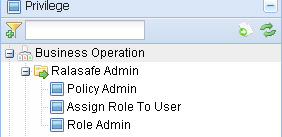
If a user contains "Assign Role To User" privilege, so which users he/her can assign to? All of users or some users?
Ralasafe thinks of "Assign Role To User" as a query privilege. Assigning security policies to it, we can resolve question "which users he/her can assign to".
Take ralasafe demo as example, we want meet these requirements:
Following these steps, we can make it:
| Step | Screen show |
|---|---|
1, make dir in {ralasafe-demo-webapp}/WEB-INF/classes/demo, make file DemoUser.java, code it; Note:
|
package demo;

import org.ralasafe.db.MapStorgeObject;

public class DemoUser extends MapStorgeObject {
	private Integer id;
	private String name;
	private String companyName;

	public Integer getId() {
		return id;
	}
	public void setId( Integer id ) {
		this.id=id;
		super.put( "id", id );
	}
	public String getName() {
		return name;
	}
	public void setName( String name ) {
		this.name=name;
		super.put( "name", name );
	}
	public String getCompanyName() {
		return companyName;
	}
	public void setCompanyName( String companyName ) {
		this.companyName=companyName;
		super.put( "companyName", companyName );
	}
}
|
| 2, compile it with ralasafe-{version-number}.jar in classpath; | javac -classpath .;../lib/ralasafe-1.0-rc1-v20100717.jar demo/DemoUser.java |
| 3, Design query "All users"; | 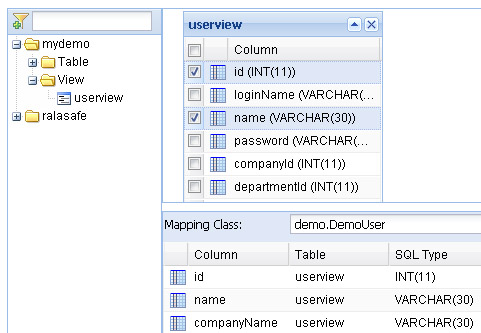 |
| 4, Design query "Users in the same branch or sub-branches" and query "Users in the same sub-branch"; (you can copy query "All users", and make small changes) | |
| 5, Assign policies to privilege "Assign Role To User"; | 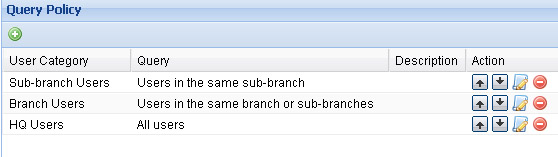 |
| 6, Assign role "Ralasafe Administrator" to Alexis Stark, John Smith and Camylle Boyd; | 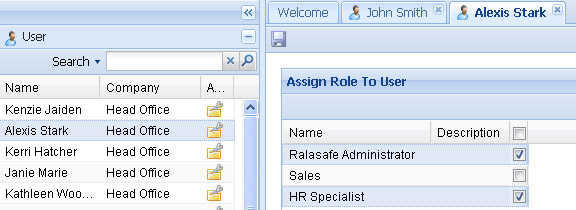 |
| 7, Enable ralasafe security, in web.xml->StartupServlet->secured. Change its value to true. Restart tomcat. |
<init-param> |
| 8, Login with demo login page, then turn to ralasafe gui page. Right image shows login by John Smith, then turn to ralasafe gui. This is the user list panel, there are 27 users he can manage. | 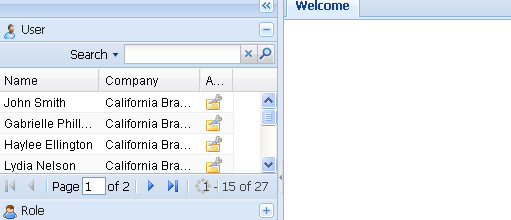 |
| |
Previous | Content | Next | |
| Let's talk about non-role privilege | Migration | |||