

| |
上页 | 目录 | 下页 | |
| 设计业务数据 | 查询权限授权策略 | |||
Ralasafe 查询设计器帮助开发人员设计查询,不需要开发DAO代码。Ralasafe可以向查询where条件设置各种参数,即prepare statement。这些参数值,可以来自于用户属性,上下文等。查询返回结果,封装为您指定的映射类。
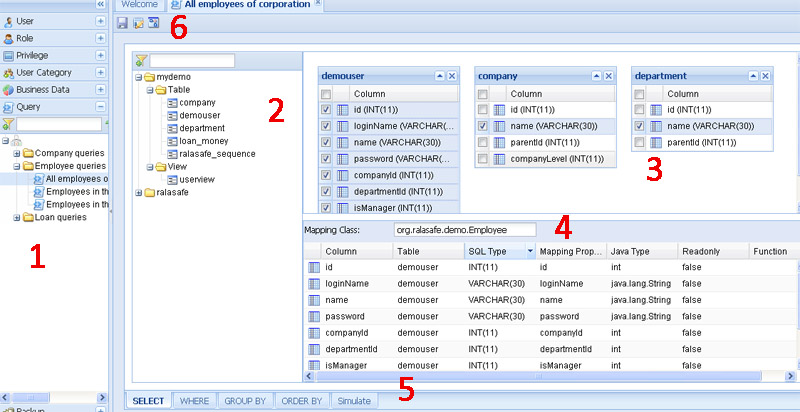
查询设计器由这些部件组成:
设计显示您在WEB-INF/ralasafe/datasources.xml配置的业务数据源。如果该数据源有很多schema,建议您在datasources.xml文件里面,指定相关schema。这样ralasafe查询设计器将只读取并显示这些schema的表格和视图,加快页面加载速度。
让我们以ralasafe demo里面的"Employees in the same branch or sub-branches"查询为例。我们的目标是要设计这样的where条件:
where   demouser.companyId=company.id
    and demouser.departmentId=department.id
    and (company.id=${user.get("companyId"}
         or company.parentId=${user.get("companyId")}
执行如下步骤:
| 步骤 | 屏幕截图 |
|---|---|
| 1, 右击"Expression Group(And)",选择"New Binary Expression"; | 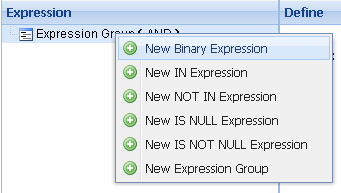 |
| 2, 点击第一个操作数,在右边选择“demouser.companyId”; | 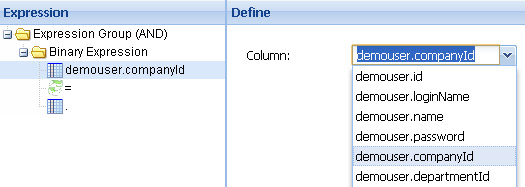 |
| 3, 点击第二个操作数,在右边选择“company.id”; | 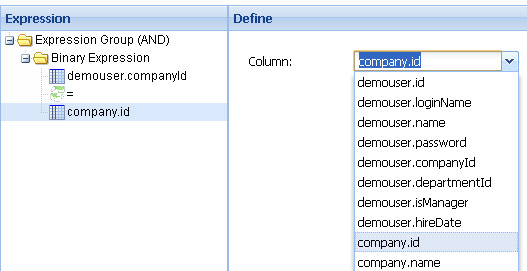 |
| 4, 到此我们设计了demouser.companyId=company.id。现在我们用同样办法设计demouser.departmentId=department.id | 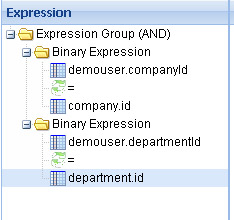 |
| 5, 右击"Expression Group (AND)",选择 "New Expression Group",然后在右边选择“OR”连接符; | 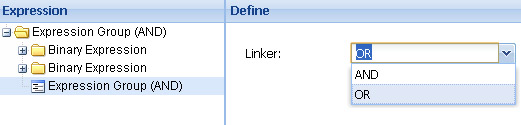 |
| 6, 增加一个Binary Expression,第一个操作数选择“company.id”,在第二个操作数上面右击,选择"Replace with User Property"; | 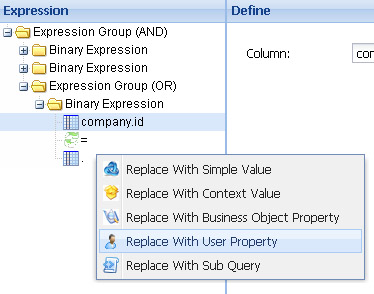 |
| 7, 在右边选择"companyId"属性; | 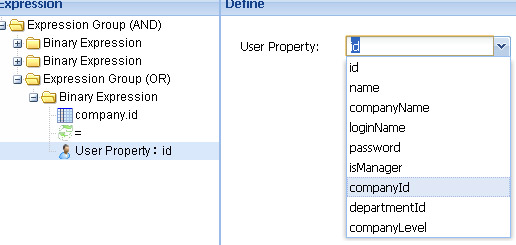 |
| 8, 用同样的办法,新增另外一个Binary Expression:company.parentId=user.companyId | 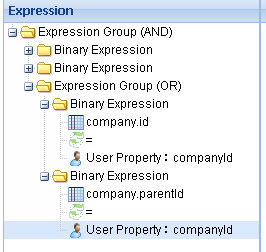 |
非常简单,您几乎可以在10秒钟完成设计。
如果查询非常复制,难以设计。您可以通过手工输入模式,直接输入。
如果两个数据查询非常类似,您可以通过复制,然后做简单修改完成,无需从头开始设计。
我们已经设计了"Employees in the same branch or sub-branches"。现在我们可以通过复制 "Employees in the same branch or sub-branches",来设计"All employees of corporation",只要去掉最后一个条件组(Expression Group)即可。非常简单快速。
当我们完成设计工作后,可以立即进行测试。测试界面如下图示:
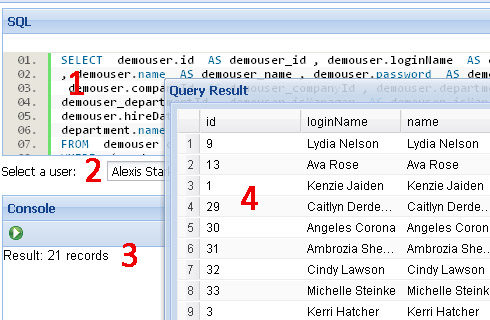
它由4个部分组成:
| |
上页 | 目录 | 下页 | |
| 设计业务数据 | 查询权限授权策略 | |||