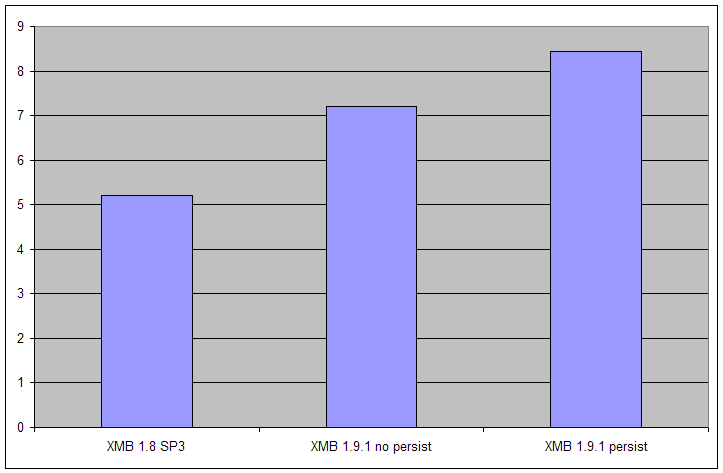
XMB had a previously unfounded reputation as a resource hog. Occasionally, it was. No longer.
XMB 1.9.5 is highly tuned for high volume web sites, with nearly all end-user pages requiring no more than 15 SQL queries. All mainstream high frequency queries use indexes, have limits, and are tuned to work efficiently with MySQL 4.0.x and later.
XMB 1.9.5 optimizes output to pump the minimum amount of data to display a page, and attachments are cache friendly. Gzip compression is on by default where it is available. Future work on XMB 2.0 will further improve XMB�s scalability.
Like all software, XMB�s performance is dependant upon three factors:
CPU utilization
Network latency and utilization
Disk I/O (particularly with regard to heavy attachment pages)
Some of these can really make or break your web site.
This feature, although interesting, adds unnecessary overhead on the busiest of forums.
By default, XMB does not use persistent connections. This is due to a bug with PHP and Apache 2.0 in module mode, where multi-threaded access can be buggy. Eventually, this will be fixed by PHP when they get their act together. However, persistent connections are a win for busy web sites. What it means is that occasionally post.php and other places in the code which update the database may occasionally lose coherency and a member will lose their post. You can fix such lossage by checking for Orphaned Threads and deleting orphaned attachments in the Administration Control panel.
The above gives you an idea of the performance of XMB 1.9.5. It can cope with nearly twice as many simultaneous users as XMB 1.8 SP3. The time to deliver a page to the last byte does not change that much, however.
XMB is compatible with the Zend and other PHP accelerators. These accelerators pre-tokenize PHP and store the byte code for later use. For some pages, such as today.php, post.php and busy polls in viewthread.php, PHP accelerators can be a huge win, whereas other types of pages do not show much of an improvement. Users will rarely see the benefit, but your hoster will thank you. Using an accelerators will decrease CPU utilization and page processing time by approximately 10-50% with no code changes.
Always use a PHP accelerator on busy sites, or on a box hosting many different XMB forums.
Forums are not supposed to be long-term repositories of information. If you perform basic system administration tasks, such as regularly pruning posts from busy forums, culling old users who have never posted, and using the �Analyze� and �Optimize� administrative functions, your database will be kept as small as possible, and as fast as MySQL can make it.
Optimize re-orders indexes and coalesces empty database pages. It should not be over-used as empty pages are re-claimed by MySQL regularly when new data is inserted. About once a week is the right frequency.
More RAM always helps.
XMB deliberately keeps per-user persistent session size to a minimum, and tries to be as frugal as possible with in-memory data structures. For example, we never use a huge associative array for things such as forum look ups.
PHP will set aside up to 8 MB of data per active user. If there are 200 active users, this is 1.6 GB of RAM required just for PHP alone. Add MySQL, the operating system, and a web server, and 2.0 GB of memory is not enough.
On very busy hosts, add as much RAM as possible to the host. If you add over 2 GB, your operating system may need tuning to access RAM over the 2 GB boundary. For example, on Windows 2000, XP and 2003, the /3GB switch is required in boot.ini. Other operating systems have difficulty with more than 4 GB of RAM on x86 32 bit architectures. You should consult your operating systems reference manual for optimal RAM tuning strategies.
When all else fails, it�s time for more than one box. Due to XMB 1.9�s historical architecture, there is only one method of separating out functionality � split up the database from the web server. Where possible, use dedicated database servers instead of placing them on the same host. This will immediately about double the total number of users XMB can support compared to a single host.
XMB has been tuned to only return the data it directly requires in every record set it queries. Therefore, network utilization between the database server and XMB will never be very high, even if MySQL has to do a lot of work to satisfy the query.
Low cost web hosting plans do not offer a great deal of scope for tuning Apache or IIS. However, in general, it's not the web server causing slowdowns - it's PHP. However, if you're using Apache, make sure there are adequate spare child servers to service every simultaneous request. Read more about tuning here:
http://phplens.com/lens/php-book/optimizing-debugging-php.php
Always use the latest stable version of PHP. No exceptions.
Use the module version of PHP. The CGI version is much slower
Ensure that gzip compression is turned on
Use shared memory sessions (compile PHP the with-mm option and set session.save_handler=mm in php.ini)
More details can be found here:
http://phplens.com/phpeverywhere/tuning-apache-php
Tuning MySQL for CPU utilization is easy: No other processes should be running on the database host other than MySQL.
In addition, under Unix, the command �renice� should be run to re-prioritize MySQL as -20 (the highest priority) as this �fixes� some schedulers to favor MySQL. This can result in up to a 60% performance jump on some SMP machines running Linux and can�t hurt under other Unixes.
Be aware that this will make the machine unresponsive to any other process, including backup programs and other housecleaning tasks, so this change should be trialled carefully.
On Windows hosts, don�t use mysqld, use mysqld-max-nt instead. This has debugging and additional memory checks disabled so it�s faster. The RAM tuning options are still relavant, however.
MySQL is tuned out of the box to only use 16 MB of RAM (and change). Clearly, this is utterly inadequate for all but the most under utilized forums. Ask your hoster to ensure that a sufficient amount of RAM is set aside for MySQL�s use. A good guide to ask for is the size of your indexes, plus say another 25% on top of that, plus �slop� for all the other users who are also using the same database server.
With XMB, some web pages are requested more frequently than others. For example, viewthread.php is called about twice as often as any other page. The following pages are requested more than 95% of the time:
viewthread.php forumdisplay.php post.php
index.php today.php
In XMB 1.9.1, all of the above pages have been carefully optimized for CPU, network and database utilization. forumdisplay.php, index.php, and today.php will ask for the same data again and again. If MySQL has this data in RAM, XMB will run much faster.
The data most often required is:
In a real world example, a large forum�s indexes (the MYI files in the MySQL database data directory) use 43 MB of disk space, and the additional table data adds up to about another 2 MB. For optimal performance, all of this should fit inside MySQL and never be paged out, so asking the hoster if MySQL has at least 45 MB of RAM set aside for key_buffer_size is fair and reasonable. Preferably, ask for 128 MB, which should be enough for this site if it�s the only user of the database server.
In a best case scenario, MySQL will have the ability to ask for (and receive) between 25% and 50% of the host�s RAM, and the rest will be for the operating system and its data caches. MySQL relies upon the OS�s caching for reads, so don�t give MySQL too much RAM. For a database server with 2 GB of RAM, the following command will immensely boost MySQL performance for up to 200 simultaneous sessions:
mysqld_safe --key_buffer_size=1024M --table_cache=256 \
--sort_buffer_size=64M --read_buffer_size=16M �max-connections=200
MySQL is a total disk hog. All database servers are. The correct layout of the underlying disks should be along the lines of:
Three physical disks or RAID sets:
disk0 Operating system and page file
disk1 MySQL data
disk2 MySQL logs and indexes
Three spindles will improve the performance of MySQL as tables and indexes can be read and written to concurrently.
Generally speaking, RAID 5 on a database server is a no-no due to its very intensive and slow data protection scheme. For most database servers, RAID 0 (mirroring) is a better option as reads are usually performed in parallel from both disks and writes are about as fast as a normal single disk. XMB�s data access patterns are very heavy reading, and light writing (about 95-99% reading).
XMB currently stores everything in the database. Although this is flexible, it can be slow. XMB 2.0 will use on-disk CSS / XHTML stylesheets, attachments and themes. This will make XMB far more cache friendly, and dramatically reduce the work MySQL has to perform on image heavy web pages.
XMB 1.9 does not support scale out, such as using a separate attachments server, or having a dedicated post server. Some scale-out options will be supported by 2.0 as long as it doesn�t overly complicate the code.
Web farms (collections of front end web servers with one or more back end database servers) are not supported at this time. XMB 2.0 will natively support web farms.
1.9 has no coherency protocol in place to prevent data corruption when two posters post at the same time. There is one exception to the web farm rule: one poster and many, many readers. This works due to the only poster is very unlikely to post from two different machines at the same time. There are few examples of this style of forum in existence, but examples may include celebrity blogging and very busy product catalogs.