Getting Started
The Traffic Server API enables you to create plugins, using the C programming language, that customize the behavior of your Traffic Server installation. This chapter contains the following sections:
- Understanding Traffic Server Plugins – a brief introduction to plugins. For more details, see How to Create Traffic Server Plugins
- A Simple Plugin – walks through compiling and loading an example hello world plugin.
- Plugin Registration and Version Checking – shows you how to register your plugin and make sure it’s compatible with the version of Traffic Server you’re using.
- Naming Conventions – outlines Traffic Server API naming conventions. For guidelines on creating plugin source code, see How to Create Traffic Server Plugins
Understanding Traffic Server Plugins
Traffic Server enables sophisticated caching and processing of web-related traffic, such as DNS and HTTP requests and responses.
Traffic Server itself consists of an event-driven loop that can be simplified as follows:
for (;;) {
   event = get_next_event();
   handle_event (event);
}
The Role of Plugins
You compile your plugin source code to create a shared library that Traffic Server loads when it is started. Your plugin contains callback functions that are registered for specific Traffic Server events. When Traffic Server needs to process an event, it invokes any and all call-back functions you’ve registered for that event type.
Caution
Since plugins add object code to Traffic Server, programming errors in a plugin can have serious implications. Bugs in your plugin, such as an out-of-range pointer, can cause Traffic Server processes to crash and may ultimately result in unpredictable behavior.
Plugin Process {#PluginProcess}
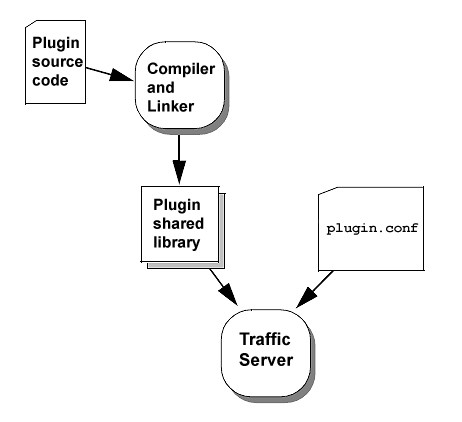
Plugin Process
Possible Uses for Plugins
Possible uses for plugins include the following:
- HTTP processing: plugins can filter, blacklist, authorize users, transform content
- Protocol support: plugins can enable Traffic Server to proxy-cache new protocol content
Some examples of plugins include:
- Blacklisting plugin: denies attempts to access web sites that are off-limits.
- Append transform plugin: adds text to HTTP response content.
- Image conversion plugin: transforms JPEG images to GIF images.
- Compression plugin: sends response content to a compression server that compresses the data (alternatively, a compression library local to the Traffic Server host machine could do the compression).
- Authorization plugin: checks a user’s permissions to access particular web sites. The plugin could consult a local authorization program or send queries to an authorization server.
- A plugin that gathers client information from request headers and enters this information in a database.
- Protocol plugin: listens for specific protocol requests on a designated port and then uses Traffic Server’s proxy server & cache to serve client requests.
The figure below, Possible Traffic Server Plugins, illustrates several types of plugins.
Possible Traffic Server Plugins {#possibleTSplugins}
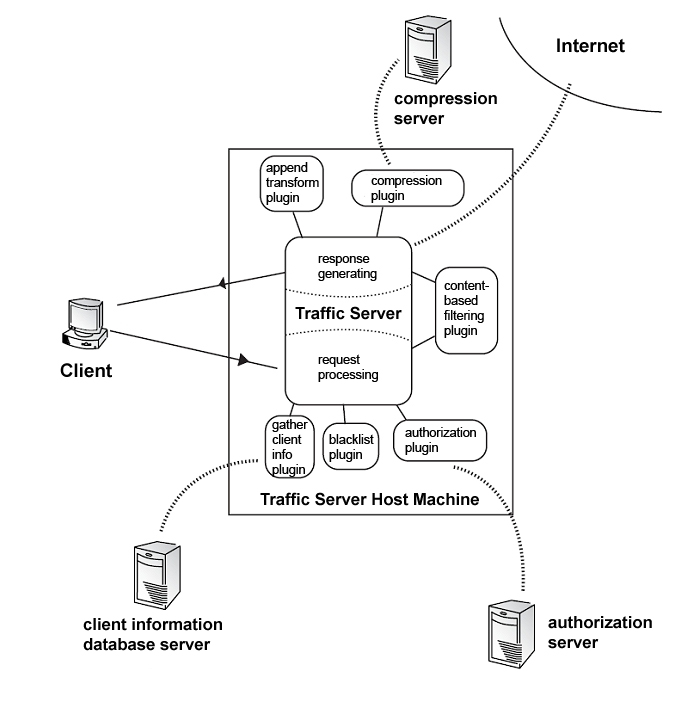
Possible Traffic Server Plugins
You can find basic examples for many plugins in the SDK sample code:
- append-transform.c adds text from a specified file to HTTP/text responses. This plugin is explained in The Append-Transform Plugin
- The compression plugin in the figure communicates with the server that actually does the compression. The server-transform.c plugin shows how to open a connection to a transformation server, have the server do the transformation, and send transformed data back to the client. Although the transformation is null in server-transform.c, a compression or image translation plugin could be implemented in a similar way.
- basic-auth.c performs basic HTTP proxy authorization.
- blacklist-1.c reads blacklisted servers from a configuration file and denies client access to these servers. This plugin is explained in The Blacklist Plugin.
Plugin Loading
When Traffic Server is first started, it consults the plugin.config file to determine the names of all shared plugin libraries that need to be loaded. The plugin.config file also defines arguments that are to be passed to each plugin’s initialization function, TSPluginInit. The records.config file defines the path to each plugin shared library, as described in Specify the Plugin’s Location.
Note
The path for each of these files is <root_dir>/config/, where <root_dir> is where you installed Traffic Server.
Plugin Configuration
The sample plugin.config file below contains a comment line, a blank line, and two plugin configurations:
# This is a comment line.

my-plugin.so junk.example.com trash.example.org garbage.example.edu
some-plugin.so arg1 arg2 $proxy.config.http.cache.on
Each plugin configuration in the plugin.config file resembles a UNIX or DOS shell command; each line in plugin.config cannot exceed 1023 characters.
The first plugin configuration is for a plugin named my-plugin.so. It contains three arguments that are to be passed to that plugin’s initialization routine. The second configuration is for a plugin named some-plugin.so; it contains three arguments. The last argument, ``$proxy.config.http.cache.on``, is actually a configuration variable. Traffic Server will look up the specified configuration variable and substitute its value.
Plugins with global variables should not appear more than once in plugin.config. For example, if you enter:
add-header.so header1
add-header.so header2
then the second global variable, header2, will be used for both instances. A simple workaround is to give different names to different instances of the same plugin. For example:
cp add-header.so add-header1.so
cp add-header.so add-header2.so
These entries will produce the desired result below:
add-header1.so header1
add-header2.so header2
Configuration File Rules
- Comment lines begin with # and continue to the end of the line.
- Blank lines are ignored.
- Plugins are loaded and initialized by Traffic Server in the order they appear in the plugin.config file.
Plugin Initialization
Each plugin must define an initialization function named TSPluginInit that Traffic Server invokes when the plugin is loaded. The TSPluginInit function is commonly used to read configuration information and register hooks for event notification.
The TSPluginInit function has two arguments:
- The argc argument represents the number of arguments defined in the plugin.config file for that particular plugin
- The argv argument is an array of pointers to the actual arguments defined in the plugin.config file for that plugin
See TSPluginInit for details about TSPluginInit.

Project Versions
RTD Search
Full-text doc search.