 |  |  |  |  |
| | | | |
 |  |
The JBI environment is managed using JMX. The internal components of the JBI environment provides a set of MBeans to facilitate the management of the JBI environment and the deployed components. In addition, the JBI environment also supplies a number of Apache Ant tasks managing the JBI environment.
The management of the JBI environment largely consists of the following:
In addition to the JMX interface, all JBI environments provide a number of Ant tasks. The Ant tasks make it possible to automate many of the common management tasks.
Java Management Extensions (JMX) is a standard technology for monitoring and managing Java applications. The foundations
for using JMX are provided as part of the standard Java 5 JVM and can be used by any Java application. It provides a lightweight way of providing monitoring
and management capabilities to any Java application that implements the MBean interface.
JBI implementations provide MBeans that can be used to manage the components installed into the container and the service units deployed into the components. In addition, application developers can add MBeans to their service units to add additional management touch points.
The MBeans can be accessed using any management console that uses JMX. JConsole, the JMX console provided with the Java 5 JRE, is an easy to use, and free, tool for managing a JBI environment. FUSE HQ(http://fusesource.com/products/fuse-hq/) is a more robust management console.
There are four basic types of artifacts that can be installed into a JBI environment:
JBI components
shared libraries
service assemblies
service units
JBI components and shared libraries are installed using the InstallationService MBean that is exposed through the JMX console.
In addition, the following Ant tasks are provided for installing and uninstalling JBI components and shared libraries;
InstallComponentTask
UninstallComponentTask
InstallSharedLibraryTask
UninstallSharedLibraryTask
When a service assembly is installed into a JBI environment all of the service units contained within the assembly are deployed to their respective JBI
components. Service assemblies and service units are installed using the DeploymentService MBean that is exposed through the
JMX console. In addition to the MBean the following Ant tasks are provided for installing service assemblies and service units:
DeployServiceAssemblyTask
UndeployServiceAssemblyTask
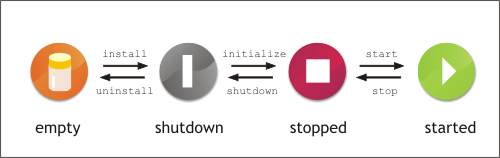
Figure 4.1 shows the life-cycle of a JBI component.
Components start life in a empty state. The component and the JBI environment have no knowledge of each other. Once the component is installed into the JBI environment, the component enters the shutdown state. In this state, the JBI environment initializes any resources needed by the component. From the shutdown state a component can be initialized and moved into the stopped state. In the stopped state, a component is fully initialized and all of its resources are loaded into the JBI environment. When a component is ready to process messages, it is moved into the started state. In this state the component, and any service units deployed into the component, can participate in message exchanges.
Components can be moved back and forth through the shutdown, stopped, and started states without being uninstalled. You can manage the lifecycle of
an installed JBI component using the InstallationService MBean and the component's ComponentLifeCycle
MBean. In addition, you can manage a component's lifecycle using the following Ant tasks:
StartComponentTask
StopComponentTask
ShutDownComponentTask
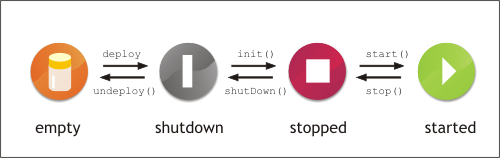
Figure 4.2 shows the life-cycle of a service unit.
Service units must first be deployed into the appropriate JBI component. The JBI component is the container that will provide the runtime resources needed to implement the functionality defined by the service unit. When a service unit is in the shutdown state, the JBI component has not provisioned any resources for the service unit. When a service unit is moved into the stopped state, the JBI component has provisioned the resources for the service unit but the service unit cannot use any of the provisioned resources. When a service unti is in the started state, the service unit is using the resources provisioned for it by the JBI container. In the started state, the functionality defined by the service unit is accessible.
A service can be moved through the different states without being undeployed. You manage the lifecycle of a service unit using the JBI environment's
DeploymentService MBean. In addition, you can manage service units using the following Ant tasks:
DeployServiceAssemblyTask
UndeployServiceAssemblyTask
StartServiceAssemblyTask
StopServiceAssemblyTask
ShutDownServiceAssemblyTask
ListServiceAssembliesTask
| |  | |
 |