

|
|
|
The Ingres .NET Data Provider is integrated with Visual Studio 2005.
The .NET Framework has design-time support. .NET objects, derived from certain component objects, can exist within an application runtime environment and in a designer environment such as Microsoft's Visual Studio 2005.
Integration with Visual Studio 2005 visual tools allows a programmer to drag-and-drop the data provider design component onto a control. Integration also allows the programmer to use wizards and editors to aid application development.
The Visual Studio 2005 Toolbox contains a series of tabs (for example, Data, Components, and Window Forms) that list objects for the Visual Studio 2005 design environment. These objects can be dragged-and-dropped onto design surfaces such as the Windows Form control (WinForm). This operation can trigger wizards, designers, or simply a paint of a control on the design surface.
|
|
|
The Ingres .NET Data Provider must be installed into the Visual Studio 2005 Toolbox before using it for the first time.
To install the data provider components into the Toolbox
The Customize Toolbox dialog is displayed.
The Ingres .NET Data Provider components are installed in the Toolbox, as shown in this example:
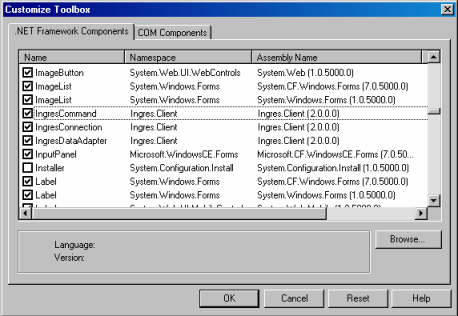
If the IngresCommand, IngresConnection, and IngresDataAdaper components do not appear in the Customize Toolbox dialog, you can add them.
To add the Ingres .NET Data Provider components to the Customize Toolbox dialog
The components are added.
|
|
|
The Toolbox's Data tab lists the .NET data provider components that are available during the application's design.
To start the Ingres Data Adapter Configuration Wizard
The welcome page of the Data Adapter Configuration Wizard is displayed.
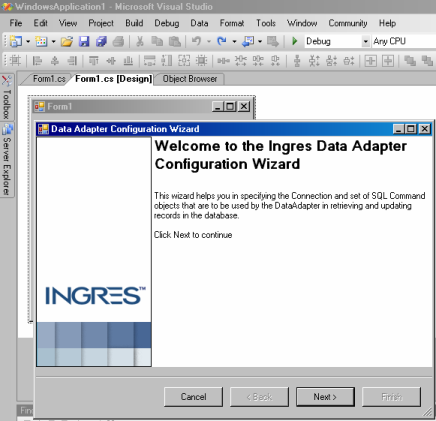
An "ingresDataAdapter1" component and its icon are added to the Visual Studio 2005 designer component tray.
Only the IngresDataAdapter component is created.
|
|
|
Ingres Data Adapter Configuration Wizard assists you in specifying the design properties of the ingresDataAdapter1 component, including its connection string definition.
A connection string is a collection of information that identifies the target server machine and database to connect to, the permissions of the user who is connecting, and the parameters that define connection pooling and security. You must configure a connection string before connecting to a database using a .NET application.
To configure a connection string
The Connection String Editor dialog is displayed.
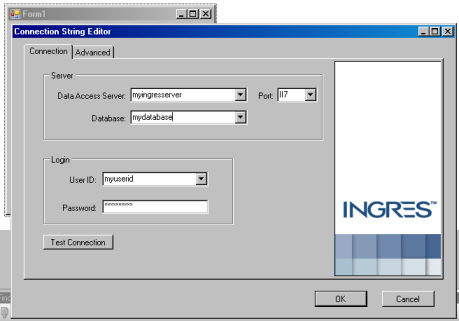
Click OK.
The Connection string is created.
|
|
|
The Connection String Editor of the Ingres Data Adapter Configuration Wizard has the following tabs:
Connection Tab
Identifies the name of the Data Access Server that services .NET application requests for the target DBMS Server.
Identifies the port number on the host server machine that the Data Access Server is listening to.
Default: II7
Is the name of the target database that the application will connect to by default.
Is the name of the authorized user that is connecting to the DBMS Server.
Is the password associated with the specified User ID for connecting to the DBMS Server.
Advanced Tab
Defines the number of seconds after which an attempted connection will abort if it cannot be established.
Default: 15
Enables or disables connection pooling.
Default: Connection pooling is enabled
Determines whether password information from the connection string is returned in a get of the ConnectionString property.
Default: Password information is not returned
Is the role identifier that has associated privileges for the role.
Is the password associated with the specified Role ID.
Is the group identifier that has associated privileges for a group of use.
|
|
|
The Ingres .NET Data Provider uses SQL statements to retrieve and update data in Ingres databases. In the Data Adapter Configuration Wizard, you can enter your SQL command or use the Query Builder tool to generate the SELECT statement.
To design a query using the Query Builder
The Add Table dialog opens.
A list of available tables is displayed.
Ingres Query Designer opens.
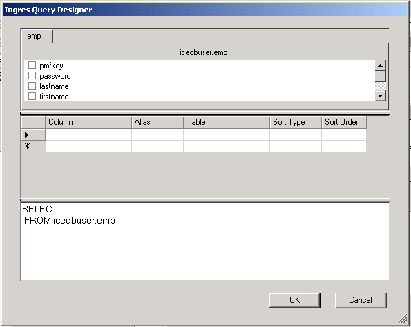
The Ingres Query Designer has three horizontal panels:
Consists of tab pages, one for each table reference in the FROM clause of the query. Each tab page contains a list of check boxes for each column defined in the table. The columns are listed as they are written in the table's catalog definition.
Check or uncheck each column to add or remove the column reference from the SELECT statement.
Is a grid that lists the column names and or expressions in the SELECT statement's column reference list. It provides a convenient tabular format for entering the column references.
Displays the query text as it is being built. The query text can be directly edited and is automatically formatted for readability.
The other two panels are automatically updated.
The query builder returns to the Ingres Data Adapter Wizard and displays the generated SELECT statement.
The Ingres Data Adapter Wizard is closed.
|
|
|
The Ingres .NET Data Provider is integrated with the Visual Studio Server Explorer and Data Sources tabs.
A Data Connection definition for Ingres can be defined in the Server Explorer. This Data Connection definition can subsequently be used by other wizards and designers in Visual Studio.
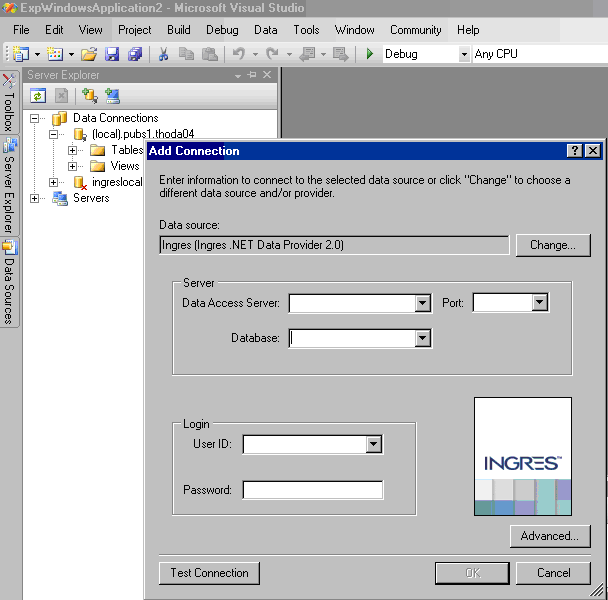
The Data Connection definition can also be used to examine the metadata information of tables and views in the Ingres connection.
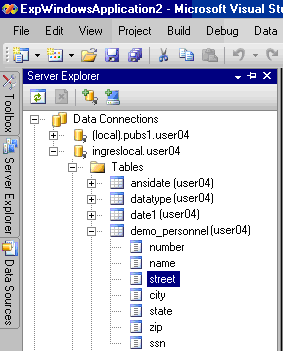
Note: The Visual Studio integration does not currently support database procedures.