

|
|
|
The Detailed Process Information screen displays detailed job/process information on the selected process (usually a server). This screen is available on VMS only.
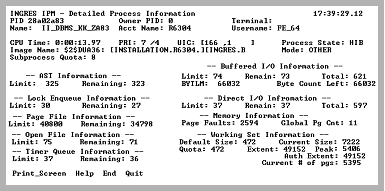
This screen helps you to determine if the quotas for the account that started this process are adequate.
The display is automatically refreshed. The Display Refresh field on the Options Display screen does not affect the refresh time of this screen.
When the process that is being monitored is deleted, an appropriate message is displayed in the upper left corner of the form. At any time, the current screen can be written to a file for later analysis. This display is useful for observing servers that are running large queries, MQTs (Multi Query Transactions), or users to ensure that there are sufficient operating system resources. For more information on JPI parameters, see the VMS System Services Manual.
|
|
|
To display the Detailed Process Information screen, select Process_Info from any of the following screens:
When invoked from the Logging area of IPM, information is displayed for a server, recovery process (RCP), or archiver (ACP).
Place the cursor on the process you want displayed from the appropriate screen before selecting this menu item.
|
|
|
The detail process information screen contains the following information:
The cumulative CPU time.
The VMS process state.
The important value is the Remaining field. When this value reaches zero the server cannot acquire any more locks. This leads to errors or lock escalation, which implies table level locking. Lock escalation causes serious concurrency problems. This is relevant only for Ingres installations on VMS clusters that use the VMS Distributed Lock Manager (DLM).
The Total field shows how many cumulative direct I/O requests were made. This indicates how much disk I/O is being performed.
Indicates if the working set sizes (also displayed) are sufficient.
The Remaining field shows how many more files the process can open. On queries that touch many tables, on databases with journals and queries that contain aggregates, the File Limit Quota (FILLM) can be exceeded if not set at sufficient levels. For more information, see the System Administrator Guide.
|
|
|
The Detailed Process Information screen has the following menu items:
Captures the current screen's contents to a file. You are prompted for the file name. This stops the screen refresh while writing the screen out. When the screen is written to the file, the screen refresh resumes.
Displays help screens.
Returns to the previous screen.
Exits IPM.