|

|

|

|

|
|
|
|
|
|
|
 |
 |
The JBI container demonstration shows how to deploy a service into a JBI container. Celtix provides a dedicated JBI service engine that enables services to plug in to the JBI container.
The JBI container demonstration is located in the following directory:
CeltixInstallDir/samples/service_creation/integration/JBI/internal_provider_external_consumer
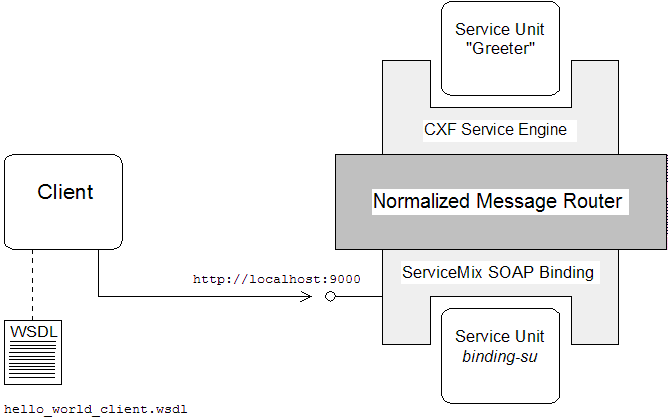
Figure 4.1, “Overview of the JBI Container Demonstration” shows the main components of the JBI container demonstration.
The normalized message router (NMR) is the core element of a JBI container. It is responsible for routing all messages between deployed JBI components. Messages sent through the router are always formatted as normalized messages.
The basic idea of an NMR is that all communication between deployed components occurs using normalized messages, which have an XML format closely modelled on the original WSDL message descriptions. Consequently, an NMR is a highly-optimized bus for the exchange of messages between Web services. For a service described in WSDL, the processing typically required to construct a normalized message is absolutely minimal.
A service engine (SE) is a JBI component that enables you to deploy services (or service providers in JBI terminology) and client programs (or service consumers in JBI terminology).
The CXF service engine is an SE that has been specifically designed to facilitate the deployment of Celtix ASE services in the JBI container. The CXF service engine is available as part of the Celtix ASE runtime.
Communication with external Web service clients is enabled by the Apache Incubator ServiceMix SOAP+HTTP binding component. In contrast to the Celtix ASE standalone demonstration (see Chapter 2, Standalone Service ), the JBI container demonstration does not use Celtix ASE’s built-in SOAP binding and HTTP transport. Instead, request messages are received by the ServiceMix SOAP+HTTP binding component and then routed to the CXF service engine through the NMR. Reply messages follow the reverse route.
A service unit is the basic functional unit of a user application. For example, a service unit can encapsulate a service provider or a service consumer. A service unit can also be used to encapsulate configuration details for a target component—for example, as shown in Figure 4.1, “Overview of the JBI Container Demonstration”
, the binding-su service unit is used to configure the ServiceMix SOAP+HTTP binding.
In this scenario, the client program has a WSDL contract that differs from the WSDL contract used on the server side. The client WSDL contract configures the client to use a SOAP binding and a HTTP transport. The server WSDL contract, on the other hand, configures the Greeter service to use a binding and transport for sending and receiving normalized messages—see xformat binding for details.
| |

|
|

|