|

|

|

|

|
|
|
|
|
|
|
 |
 |
In payload mode the router sees messages as XML documents as defined in the message element of the service contract.
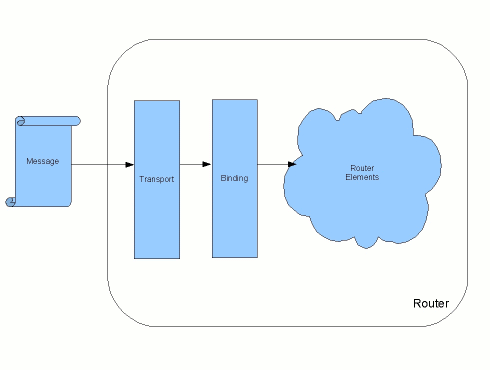
When the router operates in payload mode it skips the marshalling step used in POJO mode. As shown in Figure 4.2, “Payload Mode Message Processing”, message data is taken off the wire by the transport layer. The transport layer strips off the transport specific wrappers and passes the message to the binding layer. The binding layer converts the message into an XML document based on the WSDL message element that defines the message. This XML document is then passed into the router's components as an com.iona.cxf.router.PayloadMessage object.
The PayloadMessage class, shown in Example 4.2, “PayloadMessage”, contains the body of the message as a list of DOM elements. Each DOM element in the list represents one of the message parts as defined in the service's contract. The PayloadMessage object also contains a DOM element for the message header if one exists.
Example 4.2. PayloadMessage
public com.iona.cxf.router.PayloadMessage {private List<Element> payload ;private Element header ;public PayloadMessage(List<Element> payload,
Element header);public List<Element> getPayload();public Element getHeader();public String toString();
}
The SEI shown in Example 4.1, “Interface for Routing with POJO Mode” would generate the corresponding WSDL message elements shown in Example 4.3, “WSDL message Elements”. The input parameters for getQuote() are mapped to the message element whose name attribute is getQuote. The return parameter is mapped to message element whose name attribute is getQuoteResponse.
Example 4.3. WSDL message Elements
<wsdl:definitions ... >
  ...
  <wsdl:message name="getQuote">
    <wsdl:part name="arg0" type="xsd:string">
    </wsdl:part>
    <wsdl:part name="arg1" type="xsd:boolean">
    </wsdl:part>
  </wsdl:message>
  <wsdl:message name="getQuoteResponse">
    <wsdl:part name="return" type="tns:quote">
    </wsdl:part>
  </wsdl:message>
  ...
</wsdl:definitions>
A request message generated by invoking getQuote() would be presented to the router's internal elements as the XML document shown in Example 4.4, “XML Document Passed to the Router”.
Example 4.4. XML Document Passed to the Router
<getQuote>
  <arg0>someString</arg0>
  <arg1>false</arg1>
<getQuote>
Payload mode is supported by the following features of the router:
operation-based routing
transport bridging
message format switching
fail-over routing
message broadcasting
chained processing
routing slip routes
recipient list routes
Payload mode is the most flexible of the data modes because it is supported by most of the router's features. While the data passed into the router is not as easy to work with as it is in POJO mode, it is still not effected by changes to the underlying messaging details. Unless the data bindings specified by the interface change, the structure of the XML document passed into the router will not change.
Payload mode is faster than POJO mode. However, it is not as fast as message mode because the binding layer needs to process the message data before it is passed off to the router. The message data must also pass back through the binding layer before it is retransmitted.
Payload mode does not support using WS-Addressing headers. This means that a router using payload mode cannot participate in operations that use WS-RM or any other feature that uses WS-Addressing information.
Payload mode also does not support the use of SOAP attachements. The router does not pass attachments through to the recieving endpoint.
| |

|
|

|