Assign security policy to decision privilege
Ralasafe protects application by controlling access from two directions:
- Query information such as customers and bills from system;
- Commit data to system such as updating a customer, deleting a bill.
We call the first category privilege, query privilege; the second category privilege, decision privilege.
Ralasafe's decision privilege supports these features:
- Return different decison according to the request user;
- Retrun different deny reason according to the request user.
See javadoc for details:
- org.ralasafe.Ralasafe permit methods;
- org.ralasafe.WebRalasafe permit methods;
- org.ralasafe.entitle.Decision.
You can assign more than one policies to a decision privilege. Each policy contains decision, user category, business data and deny reason.
Ralasafe engine evaluates security policies from the beginning to the end. The steps are:
- Evaluate the request user been granted to execute this privilege or not, if not, return deny;
- Evaluate the first security policy's user category;
- If matched, evaluate business data;
- If matched, return this policy's decision. If the decison is deny, set this policy's deny reason as deny reason for this request;
- If not matched, the next policy will be evaluated;
- If not matched, the next policy will be evaluated;
- Evaluate the next security policy's user category, if matched, then evaluate business data......
- If the request user doesn't match any policy, then return deny, and deny reason is "You are not granted to execute it".
In ralasafe demo, loan money privilege is assigned with these policies:
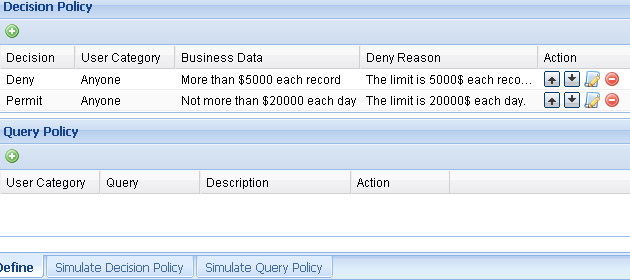
It means if any request to loan more than 5000$, will be denid; if anyone loans money less then 5000$, and all money loaned in one day is less than 20000$, permit it; else deny it.
When designing work is finished, we can test(simulate) it online immediately. This is a sample of simulation screen:
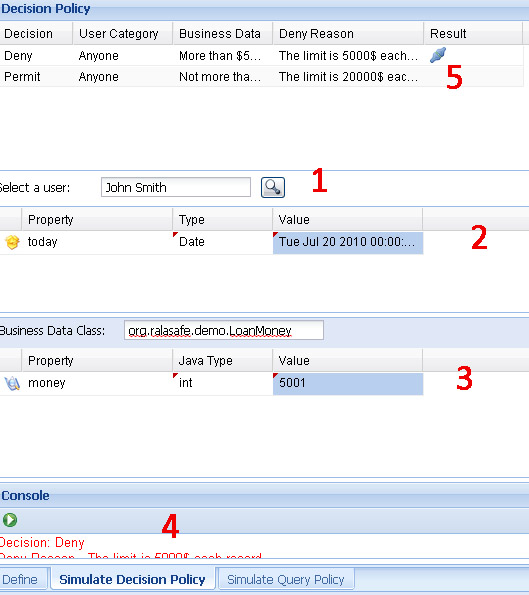
It contains five parts:
- Select user panel: click find button, select a user from pop-up user list window;
- Context value panel: this panel is optional, it shows only if policies will ectract data from context;
- Business data (javabean) panel: input your mapping class, and set needed properties' value;
- Test result panel: once click the green run button, ralasafe engine will evaluate this privilege;
- Policy and eval result panel: shows the evaluation result of each policy.

