Assign security policy to query privilege
Ralasafe protects application by controlling access from two directions:
- Query information such as customers and bills from system;
- Commit data to system such as updating a customer, deleting a bill.
We call the first category privilege, query privilege; the second category privilege, decision privilege.
Ralasafe's query privilege supports these features:
- Return different collection according to the request user;
- Support pagination;
- Support customized where condition such as employees whose first name starts with 'S';
- Support select total count;
- Support read-only fields, query result will show which fields are read-only.
See javadoc for details:
- org.ralasafe.Ralasafe query methods;
- org.ralasafe.WebRalasafe query methods;
- and org.ralasafe.entitle.QueryResult.
You can assign more than one policies to a query privilege. Each policy contains user category and query. When the request user matchs this user category, then this query will be executed and query result will be returned.
Ralasafe engine evaluates security policies from the beginning to the end. The steps are:
- Evaluate whether the request user has been granted to execute this privilege or not. If not, an empty collection(not null) will be returned;
- Evaluate the first security policy's user category;
- If matched, will be executed and query result returned;
- If not matched, policy's query will not be executed. The next policy will be evaluated;
- Evaluate the next security policy's user category, if matched, query result will be returned; else evaluate next one;......
- If the request user doesn't match any policy's user category, an empty collection (not null) will be returned.
In ralasafe demo, query employee privilege is assigned with these policies:
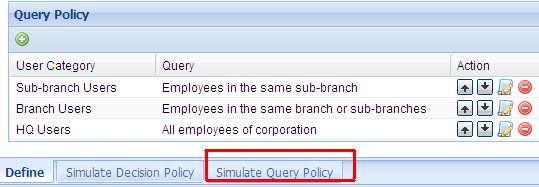
We put "Sub-branch User" as the starting policy, and "HQ Users" at the end for better efficiency. Because there are more sub-branch users than hq users, in most cases, if the first policy is matched, and there's no need to evaluate the second and third policy.
When designing work is finished, we can test(simulate) it online immediately. This is a sample of simulation screen:
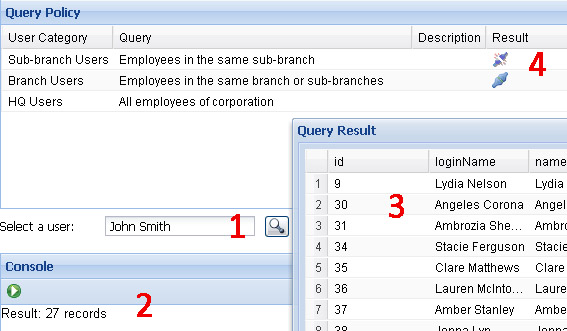
It contains four parts:
- Select user panel: click find button, select a user from pop-up user list window;
- Test result panel: click the green run button, ralasafe engine will evaluate this privilege;
- Query result panel: shows instances collection of your specified java class;
- Policy and eval result panel: shows the evaluation result of each policy.

