Installation
Ralasafe is available under MIT license. You can download it from ralasafe website. We recommend you download ralasafe with demo. It's almost the same size as ralasafe without demo.
Install with demo (recommended!)
Following these steps, you can install and run ralasafe demo easily. Installation is very simple, just unzip, copy dir, import sql and modify some configuration. Assuming tomcat and mysql is installed.
- First, unzip ralasafe-demo{version-number}.zip, we assume to ralasafe-demo{version-number} dir;
- Make a dir named demo in your tomcat webapps dir;
- Copy files and dirs under ralasafe-demo{version-number}/WebContent to demo dir;
- Copy xml dir to demo dir. The result looks like this;
- Import ralasafe-demo{version-number}/sql/demo.sql to your mysql database, it will create ralasafe and mydemo schemas and import data. (CAUTION: it will drop ralasafe and mydemo schemas. Please BACKUP them if needed!) We exported demo.sql with MySQL GUI Tools 5.0;
- Goto line 73 and modify demo/WEB-INF/web.xml. Update repositoryDir's value to your absolute xml path (copied at step 4). I'm using d:/apache-tomcat-5.5.28/webapps/demo/xml/;
- If your mysql's username/password is not root/1234, then modify two datasource property files. Under dir demo/WEB-INF/ralasafe, edit ralasafe-db.properties and app-ds.properties, and change the values of jdbcUser and jdbcPassword;
- Startup tomcat. Refer to these pages:
- Login page: http://localhost:8080/demo/ralasafe/demo/login.jsp
- Ralasafe GUI: http://localhost:8080/demo/ralasafe/designer
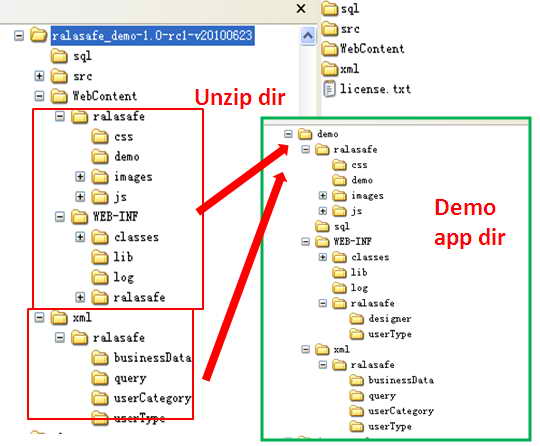
(Unzip dir and demo app dir in tomcat.)
Installing ralsafe is very easy. Just unzip, copy dir, merge 3-rd libs, merge web.xml, import ralasafe sql and config datasource.
- Unzip ralasafe{version-number}.zip to ralasafe-{version-number} dir;
- Copy ralasafe{version-number}.jar in lib dir to your project's library or classpath;
- Copy files and dirs in WebConent to your WebContent dir. Be careful with web.xml. If you already have a web.xml, merge it;
- Copy libs in 3rdlib dir to your library, you can omit some jars if you already have it;
- Import sql/create-database.sql to your database, it's recommended that you create ralasafe schema, and execute create-database.sql in ralasafe schema, so that ralasafe data can be separated from your application data;
- Config datasource and specify policy repository dir;
- Config usermetadata, and install it through url http://localhost:8080/{your web app}/ralasafe/userTypeMng;
- Start webserver, the url of ralasafe GUI is http://localhost:8080/{your web app}/ralasafe/designer.

