

auditd, rsyslogd, and setroubleshootd daemons are running. Refer to Section 5.2, “Which Log File is Used” for information about starting these daemons. A number of tools are available for searching for and viewing SELinux denials, such as ausearch, aureport, and sealert.
ausearch. From the ausearch(8) manual page: "ausearch is a tool that can query the audit daemon logs based for events based on different search criteria"[14]. The ausearch tool accesses /var/log/audit/audit.log, and as such, must be run as the Linux root user:
| Searching For | Command |
|---|---|
| all denials | /sbin/ausearch -m avc |
| denials for that today | /sbin/ausearch -m avc -ts today |
| denials from the last 10 minutes | /sbin/ausearch -m avc -ts recent |
-c comm-name option, where comm-name "is the executable’s name"[15], for example, httpd for the Apache HTTP Server, and smbd for Samba:
/sbin/ausearch -m avc -c httpd
/sbin/ausearch -m avc -c smbd
ausearch options.
aureport. From the aureport(8) manual page: "aureport is a tool that produces summary reports of the audit system logs"[16]. The aureport tool accesses /var/log/audit/audit.log, and as such, must be run as the Linux root user. To view a list of SELinux denials and how often each one occurred, run the aureport -a command. The following is example output that includes two denials:
# /sbin/aureport -a

AVC Report
========================================================
# date time comm subj syscall class permission obj event
========================================================
1. 05/01/2009 21:41:39 httpd unconfined_u:system_r:httpd_t:s0 195 file getattr system_u:object_r:samba_share_t:s0 denied 2
2. 05/03/2009 22:00:25 vsftpd unconfined_u:system_r:ftpd_t:s0 5 file read unconfined_u:object_r:cifs_t:s0 denied 4
aureport options.
sealert, which reads denial messages translated by setroubleshoot-server. Denials are assigned IDs, as seen in /var/log/messages. The following is an example denial from messages:
setroubleshoot: SELinux is preventing httpd (httpd_t) "getattr" to /var/www/html/file1 (samba_share_t). For complete SELinux messages. run sealert -l 84e0b04d-d0ad-4347-8317-22e74f6cd020
84e0b04d-d0ad-4347-8317-22e74f6cd020. The -l option takes an ID as an argument. Running the sealert -l 84e0b04d-d0ad-4347-8317-22e74f6cd020 command presents a detailed analysis of why SELinux denied access, and a possible solution for allowing access.
setroubleshootd, dbus and auditd daemons are running, a warning is displayed when access is denied by SELinux. Clicking on 'Show' launches the sealert GUI, and displays denials in HTML output:
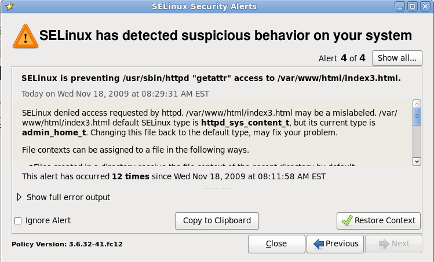
sealert -b command to launch the sealert GUI.
sealert -l \* command to view a detailed analysis of all denials.
sealert -a /var/log/audit/audit.log -H > audit.html command to create a HTML version of the sealert analysis, as seen with the sealert GUI.
sealert options.
[14] From the ausearch(8) manual page, as shipped with the audit package in Red Hat Enterprise Linux 6.
[15] From the ausearch(8) manual page, as shipped with the audit package in Red Hat Enterprise Linux 6.
[16] From the aureport(8) manual page, as shipped with the audit package in Red Hat Enterprise Linux 6.