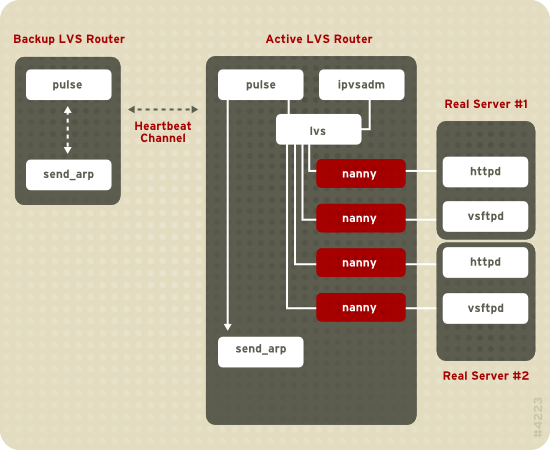
1.6. Load Balancer Add-On — A Block Diagram
If the backup router does not receive a response from the active router, it initiates failover by calling send_arp to reassign all virtual IP addresses to the NIC hardware addresses (MAC address) of the backup node, sends a command to the active router via both the public and private network interfaces to shut down the lvs daemon on the active router, and starts the lvs daemon on the backup node to accept requests for the configured virtual servers.
1.6.1. Load Balancer Add-On Components
This is the controlling process which starts all other daemons related to LVS routers. At boot time, the daemon is started by the /etc/rc.d/init.d/pulse script. It then reads the configuration file /etc/sysconfig/ha/lvs.cf. On the active router, pulse starts the LVS daemon. On the backup router, pulse determines the health of the active router by executing a simple heartbeat at a user-configurable interval. If the active router fails to respond after a user-configurable interval, it initiates failover. During failover, pulse on the backup router instructs the pulse daemon on the active router to shut down all LVS services, starts the send_arp program to reassign the floating IP addresses to the backup router's MAC address, and starts the lvs daemon.
The lvs daemon runs on the active LVS router once called by pulse. It reads the configuration file /etc/sysconfig/ha/lvs.cf, calls the ipvsadm utility to build and maintain the IPVS routing table, and assigns a nanny process for each configured Load Balancer Add-On service. If nanny reports a real server is down, lvs instructs the ipvsadm utility to remove the real server from the IPVS routing table.
This service updates the IPVS routing table in the kernel. The lvs daemon sets up and administers Load Balancer Add-On by calling ipvsadm to add, change, or delete entries in the IPVS routing table.
The nanny monitoring daemon runs on the active LVS router. Through this daemon, the active router determines the health of each real server and, optionally, monitors its workload. A separate process runs for each service defined on each real server.
1.6.1.5. /etc/sysconfig/ha/lvs.cf
This is the Load Balancer Add-On configuration file. Directly or indirectly, all daemons get their configuration information from this file.
1.6.1.6. Piranha Configuration Tool
This is the Web-based tool for monitoring, configuring, and administering Load Balancer Add-On. This is the default tool to maintain the /etc/sysconfig/ha/lvs.cf Load Balancer Add-On configuration file.
This program sends out ARP broadcasts when the floating IP address changes from one node to another during failover.