Introduction
All Torque2D projects have a standard game flow that exists from the moment the game is loaded until the game is shut down.
The File Hierarchy
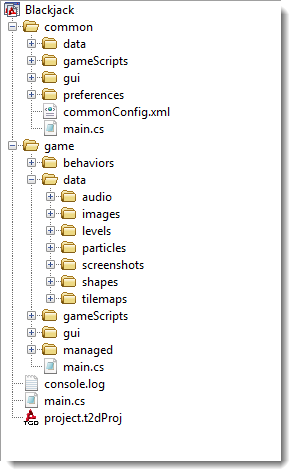
This image represents the hierarchy for the script files that we will
be discussing in this reference manual. Please refer to it whenever a
file location id mentioned.
Starting the Game
When the system first loads the game, the main.cs located in the /ProjectFiles/common folder is run. This file contains the function to run when the game is first loaded - using the onStart(); function, and the function to run when the game is finished shutting down - using the onExit(); function. Once the Main.cs file has finished loading into memory, the onStart(); will be automatically called, at the very bottom of the script file.
When the onStart(); is run, it will execute the various game loading scripts, including:
- /scripts/game.cs - The launching point for the TorqueScript code unique to your game.
- /scripts/system/system.cs - The launching point for the TorqueScript code that manages file loading and system actions, unique for your game.
When this loading has been completed, the function initalizeGame(); will be called. This function is defined in /scripts/game.cs.
The initalizeGame(); function will call the startGame(); function. This function accepts the global variable $Game::DefaultScene, which is the default .t2d file to load when the game is first launched.
The value of the global variable $Game::DefaultScene is defined in /scripts/system/defaultPrefs.cs near the top of the file. The default level that is loaded is data/levels/emptyLevel.t2d, however this can be changed to whatever the first level file you need to load for your game might be.
The startGame(); function is located just below the initalizeGame(); function in /scripts/game.cs.
At this point the first level will have loaded and your game has begun!
Managing Game Processes
Torque2D games, on the TorqueScript level, do not contain a Main
loop like the C++ engine-level contains. To put it simply, the engine
waits to receive commands from the Script level, and then runs them.
Thanks to this you do not need to manage a constant logic loop or cycle
of any kind. Just setup your code and the objects in your game world,
and they will react appropriately when they are toggled, used or
manipulated by the user.
Conclusion
Torque2D projects all have a standard game flow. This game flow is
clean and easy to work with, and does not require a Main logic loop to
be constantly maintained - actions simply need to be performed to occur. |