Splash screen
Beginner
The splash screen is the image (usually containing a logo) displayed when your game starts. It fades in over the color you specify, then fades out.
Note
The splash screen is only displayed when the game is built in release mode.
The default splash screen is the Xenko logo.

You can only specify one splash screen in Game Settings. If you want to add more, you need to implement them manually.
Warning
Under the terms of the Xenko end user license agreement, Xenko Personal (free) users must display the "Powered by Xenko" logo in the splash screen. If you're using Xenko with a free license, you can edit the splash screen image — for example, by adding a logo above or below the Xenko logo — but you must adhere to the Xenko logo regulations (PDF).
Edit the splash screen
The splash screen settings are part of the Game settings asset.
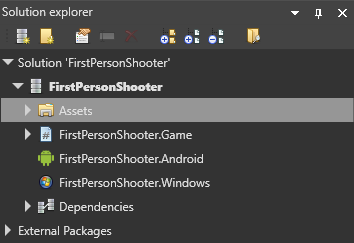
In the solution explorer (the bottom-left pane by default), select the Assets folder.
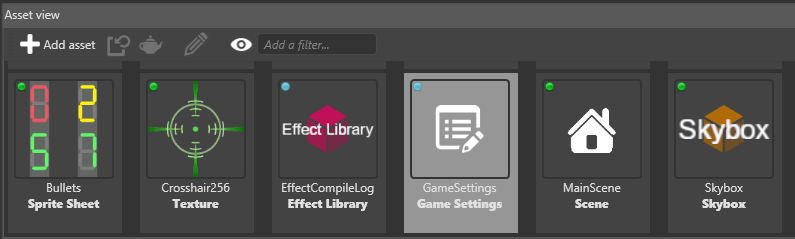
In the asset view (the bottom pane by default), select the GameSettings asset.
In the property grid (the right-hand pane by default), expand Splash screen.
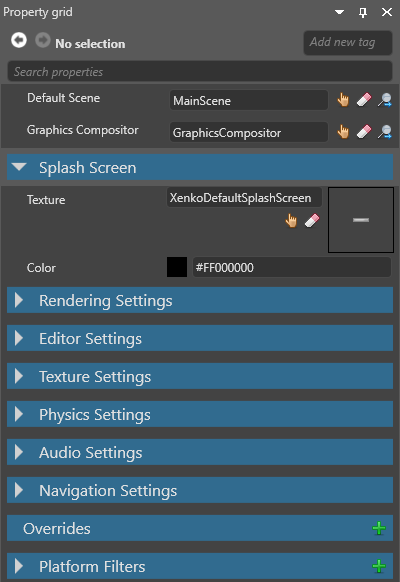
Splash screen properties
| Property | Description |
|---|---|
| Texture | The image (eg company logo) displayed as the splash screen. By default, this is XenkoDefaultSplashScreen. |
| Color | The color the splash screen fades in on top of. By default, this is black (#FF000000). |