Automatic shader stage input/output
Current state of shaders
When you write a HLSL shader, you have to precisely define your vertex attributes and carefully pass them across the stage of your final shader.
Here's an example of a shader that simply uses the color from the vertex.
Code: Simple HLSL shader
struct VS_IN
{
    float4 pos : POSITION;
    float4 col : COLOR;
};

struct PS_IN
{
    float4 pos : SV_POSITION;
    float4 col : COLOR;
};

PS_IN VS( VS_IN input )
{
    PS_IN output = (PS_IN)0;

    output.pos = input.pos;
    output.col = input.col;

    return output;
}

float4 PS( PS_IN input ) : SV_Target
{
    return input.col;
}

technique10 Render
{
    pass P0
    {
        SetGeometryShader( 0 );
        SetVertexShader( CompileShader( vs_4_0, VS() ) );
        SetPixelShader( CompileShader( ps_4_0, PS() ) );
    }
}
Imagine you want to add a normal to you model and modify the resulting color according to it. You have to modify the code that computes the color and adjust the intermediate structures to pass the attribute from the vertex to the pixel shader. You also have to be careful of the semantics you use.
Code: Modified HLSL shader
struct VS_IN
{
    float4 pos : POSITION;
    float4 col : COLOR;
    float3 normal : NORMAL;
};

struct PS_IN
{
    float4 pos : SV_POSITION;
    float4 col : COLOR;
    float3 normal : TEXCOORD0;
};

PS_IN VS( VS_IN input )
{
    PS_IN output = (PS_IN)0;

    output.pos = input.pos;
    output.col = input.col;
    output.normal = input.normal;

    return output;
}

float4 PS( PS_IN input ) : SV_Target
{
    return input.col * max(input.normal.z, 0.0);
}

technique10 Render
{
    pass P0
    {
        SetGeometryShader( 0 );
        SetVertexShader( CompileShader( vs_4_0, VS() ) );
        SetPixelShader( CompileShader( ps_4_0, PS() ) );
    }
}
This example is simple, but in a real project, the number of shaders is much higher and a single change might mean rewriting lots of shaders, structures, and so on.
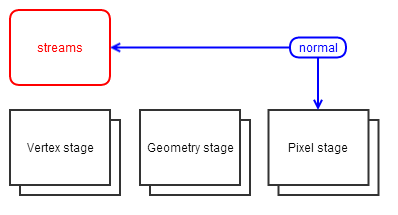
Schematically, adding a new attribute requires you to update all the stages and intermediate structures from the vertex input to the last stage you want to use the attribute.
XKSL
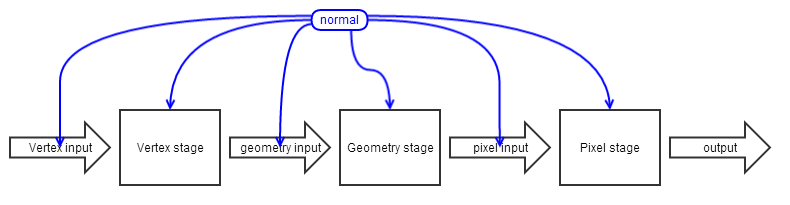
XKSL is convenient way to pass parameters across the different stages of your shader. The stream variables are:
- variables
- defined like any shader member, with the stream keyword
- invoked with the streams prefix. Forgetting it results in a compilation error. When the stream is ambiguous (same name), you should provide the shader name in front of the variable. streams.<my_shader>.<my_variable>
Streams regroup the concept of attribute, varying and output in a single concept.
- an attribute is a stream that's read in a vertex shader before being written
- an output is a stream that's assigned before being read
- a varying is a stream that's present across the stage of your shader
Think of streams as a global object that you can access everywhere without having to put it as a parameter of your functions.
You don't have to create a semantic for these variables. The compiler creates them automatically. However, keep in mind that the variables sharing the same semantic will be merged in the final shader. So be careful when using a semantic. This behavior can be useful when you want to use a stream variable locally without inheriting from the shader where it was declared.
Once you've declared a stream, you can access it at any stage of your shader. The shader compiler takes care of everything. The variables just have to be visible from the calling code (ies in the inheritance hierarchy) like any other variable.
Code: Stream definition and use:
shader BaseShader
{
    stream float3 myVar;

    float3 Compute()
    {
        return streams.myVar;
    }
};
Code: Stream specification
shader StreamShader
{
    stream float3 myVar;
};

shader ShaderA : BaseShader, StreamShader
{
    float3 Test()
    {
        return streams.BaseShader.myVar + streams.StreamShader.myVar;
    }
}
Example of XKSL shader
Let's look at the same HLSL shader as the first example but in XKSL.
Code: Same shader in XKSL
shader MyShader : ShaderBase
{
    stream float4 pos : POSITION;
    stream float4 col : COLOR;

    override void VSMain()
    {
        streams.ShadingPosition = streams.pos;
    }

    override void PSMain()
    {
        streams.ColorTarget = streams.col;
    }
};
Now let's add the normal computation.
Code: Modified shader in XKSL
shader MyShader : ShaderBase
{
    stream float4 pos : POSITION;
    stream float4 col : COLOR;
    stream float3 normal : NORMAL;

    override void VSMain()
    {
        streams.ShadingPosition = streams.pos;
    }

    override void PSMain()
    {
        streams.ColorTarget = streams.col * max(streams.normal.z, 0.0);
    }
};
In XKSL, adding a new attribute is as simple as adding it to the pool of streams and use it where you want!