Triggers
Beginner Designer
If you set a collider to be a trigger, other colliders no longer bump into it. Instead, they pass through.
The trigger detects when colliders enter it, which you can use to script events. For example, you can detect when a player character enters a room, and use this in your script to trigger an event. For more information, see Events.
Note
Character colliders can't be used as triggers.
Create a trigger
Create a collider.
In the Property grid, under the collider component properties, select Is Trigger.
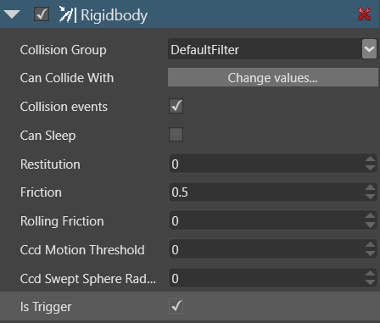
Detect trigger collisions
You can see when something enters the trigger using the following code:
// Wait for an entity to collide with the trigger
                var firstCollision = await trigger.NewCollision();

                var otherCollider = trigger == firstCollision.ColliderA ? firstCollision.ColliderB : firstCollision.ColliderA;
Alternatively, directly access the TrackingHashSet:
var trigger = Entity.Get<PhysicsComponent>();
foreach (var collision in trigger.Collisions)
{
    //do something with the collision
}
Or use the TrackingHashSet events:
var trigger = Entity.Get<PhysicsComponent>();
trigger.Collisions.CollectionChanged += (sender, args) =>
{
    if (args.Action == NotifyCollectionChangedAction.Add)
    {
        //new collision
        var collision = (Collision) args.Item;
        //do something
    }
    else if (args.Action == NotifyCollectionChangedAction.Remove)
    {
        //old collision
        var collision = (Collision)args.Item;
        //do something
    }
};
For an example of how to use triggers, see the Script a trigger tutorial.