Getting Started
- Introduction
- Sample Application
- Environment Setup
- Starter App
- Entities
- Value Objects
- Services
- Console App
- Associations
- Complete the Model
- Enhance Console App
Project Documentation

This page provides directions to create the PeopleService using MagicDraw. The model is shown below for your reference.
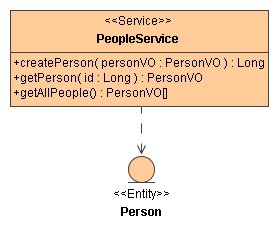
service under
org.andromda.timetracker. We will create our services in this package.service package and select
New Diagram > Class Diagram. Type in Services as the name of this diagram
and click OK. The diagram is created and opened in a new window.PeopleService.PeopleService.PeopleService as shown above. Be careful with the return type
of the last method. It is not interpretted as a PersonVO[] type when entered
through the diagram. Double-click on the method and choose the correct return type in the
operation specification dialog box.Person class on to the diagram.PeopleService to Person.
We are now ready to generate code for the PeopleService. Please go back to the main
tutorial page and continue from where you left off.