

|
|
|
The Server Detail screen displays information about a selected server.
To display detailed information on a server, position the cursor at a server in the Server List and select More_Info from the Server List menu. The Server Detail pop-up is displayed. The boxed area shows the session count information.
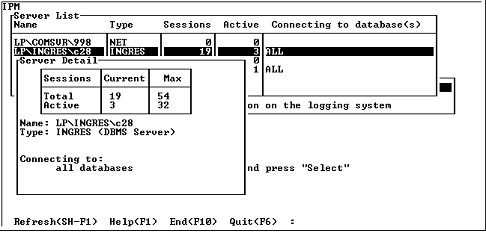
The Server Detail Screen (More_Info) screen displays the following information:
Number of sessions connected to the specified server.
Maximum number of sessions that the specified server can handle at any one time. This is equivalent to the server configuration parameter, connected_sessions.
Number of sessions in a computable state. The server does not yet provide a count of the number of active transactions to IPM; therefore, this number is always 0.
Maximum number of sessions that can be in a computable state. It is equivalent to the active_sessions server configuration parameter. This qualifier to the server startup command currently has no effect on the number of computable sessions allowed at any one time.
The maximum and active maximum sessions are determined at server startup.
UNIX: The Idle Quantums field is not displayed.
VMS: The amount of CPU used is displayed in terms of Quantums in the Idle Quantums field. As an example, a display of 324485/327697 indicates that there were 324,485 quantums idle out of 327,697 total quantums while this server was active.
|
|
|
The Server Detail screen has the following menu items:
Queries the specified server for server detail information. If the specified server no longer exists, a message is displayed.
Displays help screens.
Returns to the Server List screen.
Exits IPM.