

|
|
|
The Session List screen appears when you select Sessions from the Server List screen. This pop-up screen displays the sessions for the selected server. The selected server is the one on which the cursor rests in the Server List.
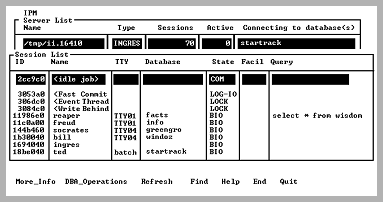
The Session List screen has the following columns:
Uniquely identifies the session.
Name of the session. This is a scrollable field; move the cursor to the field and use the arrow keys to see the entire contents.
Internal sessions are displayed with angle brackets <>. The bracketed internal sessions are available only if the option (Display Internal Sessions?) in the options panel is set to y. The default setting is n. Session names for user sessions are usually the same as the user name. (Both the user name and session name are shown under More_Info).
Terminal name, if known. Network and internal sessions do not show a terminal.
The database to which the session is currently connected.
State of the session. Use the Find menu item to search this column. The following states are shown. Note that these states are not identical in meaning for internal sessions, such as the Fast Commit Thread:
The session is waiting for client communications.
The session is computable; it is not waiting for the user or for I/O.
The session is waiting for disk I/O.
The session is about to terminate.
The session is waiting for another session to release locks. The wait continues until the other session completes its transaction.
The session is waiting for output to the log file.
The session is waiting for another session to complete accessing an internal data structure. The wait continues only until the other session is done accessing.
The server facility currently handling the session. The More_Info screen spells out the meaning of the facility acronym. Examples are:
Data Manipulation Facility
Optimizer Facility
Query Execution Facility
The first 24 characters of the query currently running is shown. This field is displayed only if the user running IPM is a privileged user.
The More_Info screen shows more of the query. The query is shown only if it is current. A current query is one being processed by the Ingres DBMS Server, not a query that has returned results and finished executing, even though the user has not committed.
|
|
|
The Session List screen has the following menu items:
Displays the Session Detail screen. This screen displays information about the selected session, indicated by the cursor position when this menu item is selected.
For more information on this, see Server Detail Screen (More_Info).
Displays a submenu that allows a privileged user to delete the session on which the cursor is positioned.
The submenu choices are:
Removes session from the server. Any open transactions it has are rolled back.
Same as Find menu item below.
Returns to the Session List screen.
Caution! Do not remove internal sessions (marked with angle brackets <>). Removing an internal session must be used only as a last resort and only with assistance from Customer Support.
Removing an internal session can cause the loss of all uncommitted transactions and can prevent you from properly shutting down your Ingres installation.
Queries the specified server for a list of sessions and refresh the display. If the server no longer exists, a message is printed.
Searches for matching values in any column in the scrolling area. Tab to the desired column and select Find.
For example, use Find to search for LOCK in the State column.
Displays help screens.
Returns to the Server List screen.
Exits IPM.