

This chapter discusses the IPM screens that display server information.
|
|
|
Server information displayed by IPM includes server lists, session lists, and related information.
A privileged user can terminate servers or sessions.
To review server information, select Server_List from the Main Menu.
|
|
|
The Server List screen displays the servers registered with the Name Server.
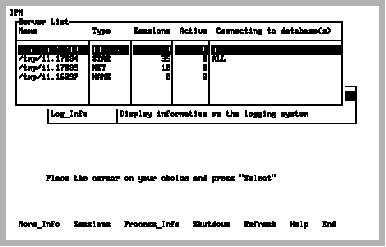
The Server List screen contains the following fields:
This field contains the name of the server.
This field contains the type of server: Ingres DBMS Server, Ingres Star Server, Ingres Communications Server, or NAME (Name server, or GCN).
This field displays the number of sessions in the server.
This field contains the number of active sessions.
This field indicates the databases that are accessible from this server. If your installation is running a server that was configured to connect to only certain databases (the _dblist server parameter), IPM lists each database (with the same server name) on a separate line. Otherwise, it displays ALL to indicate that this server can connect to any database in the current Ingres installation. If there are many databases or long database names, they can be displayed using the More_Info menu item.
|
|
|
The Server List screen contains the following menu items:
Displays the Server Detail screen. The Server Detail screen contains more information for the server on which the cursor is positioned. This screen is available only for the Ingres DBMS Server and Ingres Star Servers.
For more information on this, see Server Detail Screen (More_Info).
Displays the Session List screen. The Session List screen shows all of the sessions for the server on which the cursor is positioned. The information displayed includes the session name and session id. This screen is available only for the Ingres DBMS Server and Ingres Star Server.
For more information on this, see Session List Screen.
VMS:
Displays the Detailed Process Information screen. The Detailed Process Information screen shows various job and process information (JPI) for the server on which the cursor is positioned. Such information includes CPU time, Direct I/O, Buffered I/O, Enqueue limit, and so on. This display automatically refreshes and can be selected for any server except the Name Server.
For more information on this screen, see Detailed Process Information Screen (VMS Only). 
Displays a submenu that allows a privileged user to shut down a server normally or in an emergency. Only the Ingres DBMS Server or Ingres Star Server can be specified. Available choices are:
Same as set server shutdown in iimonitor, Soft_Shutdown is preferred, provided it is OK to wait until the current sessions end before the server stops. After this menu item is executed, the connection to the server is maintained and the submenu reappears. This allows the Hard_Shutdown menu item to be selected, if desired. If IPM is connected to the server you are trying to shut down, you must exit from IPM for the shutdown to complete.
Same as stop server in iimonitor. Use this instead of operating system commands like VMS stop or UNIX kill -9. Executing this menu item immediately stops the server and breaks out of the submenu.
Drops the server connection after Soft_Shutdown and returns to the Server List screen. After using this option, you cannot reconnect to the server.
Queries the Name Server for a list of servers. If there are none, IPM displays a message to that effect and returns to the Main Menu screen.
Displays help screens.
Returns to the Main Menu screen.
Exits IPM.