|

|

|

|

|
|
|
|
|
|
|
 |
 |
You can use the JMX console to deploy and manage applications in the Celtix Spring container. Specifically you can deploy applications as well as stop, start, remove, and list applications that are running in the container. You can also get information on the application’s state. The name of the deployed WAR file is the name given to the application.
To use the JMX console to manage applications deployed to the Celtix Spring container do the following:
Start the JMX console by running the following command from the InstallDir/bin
Windows: jmx_console_start.bat
UNIX: jmx_console_start.sh
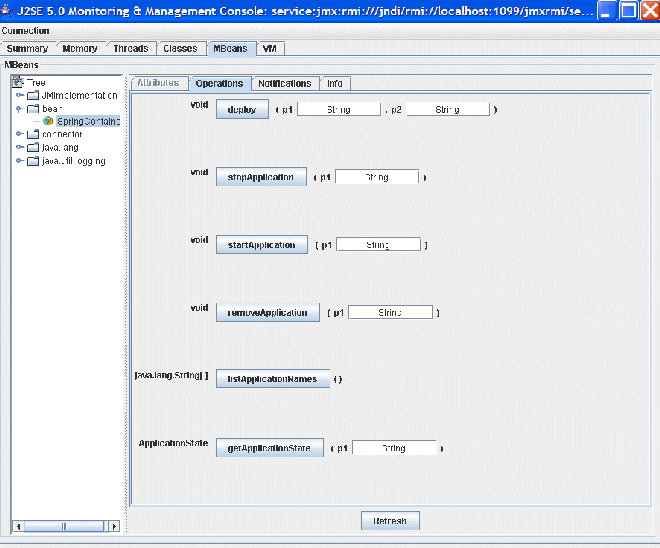
Select the MBeans tag and expand the bean node to view the SpringContainer MBean, which is deployed as part of the Spring container (see Figure 1.2, “JMX Console—SpringContainer
MBean”
). This MBean gives you access to the management interface for the Spring Container and can be used to deploy, stop, start, remove, and list applications.
The operations and their parameters are described in Table 1.1, “JMX Console—SpringContainer MBean Operations” :
Table 1.1. JMX Console—SpringContainer MBean Operations
| Operation | Description | Parameters |
|---|---|---|
deploy
|
Deploys an application to the container repository. The deploy method copies
a WAR file from a given URL or file location into the container repository. |
location—a URL or file location that points to
the application to be deployed.
warFileName—the name of the WAR file as you want it to
appear in the container repository. |
stopApplication
|
Stops the specified application. It does not remove the application from the container repository. | name—specifies the name of the application that
you want to stop. The application name is taken from, and is therefore the
same as, the WAR file name. |
startApplication
|
Starts an application that has previously been deployed and subsequently stopped. | name—specifies the name of the application that
you want to start. The application name is taken from, and is therefore
the same as, the WAR file name. |
removeApplication
|
Stops and removes an application. It completely removes an application from the container repository. | name—specifies the name of the application that
you want to stop and remove. The application name is taken from, and is therefore
the same as, the WAR file name. |
listApplicationNames
|
Lists all of the applications that have been deployed. The applications can be in one of three states: start, stop, or failed. An application’s name is taken from, and is therefore the same as, its WAR file name. | None. |
getApplicationState
|
Reports the state of an application; that is, whether it is running or not. | name—specifies the name of the application whose state
you want to know. The application name is taken from, and is therefore the
same as, the WAR file name. |
| |

|
|

|