Spot lights
Beginner Designer Artist
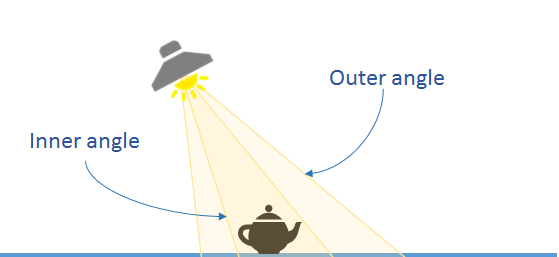
Spot lights produce a cone of light in a specific direction. They're useful for simulating light from objects such as lampposts and flashlights. They cast shadows. You can control them with scripts or animation to create dramatic lighting effects.
The scene editor shows the position of the spot light with the following icon:
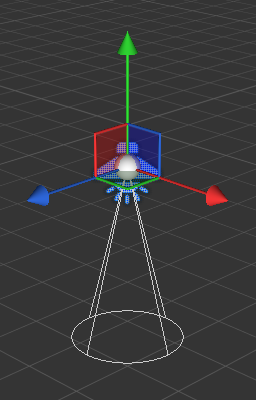
Once selected, the gizmo of the spot light displays its main direction, range and the outer cone:
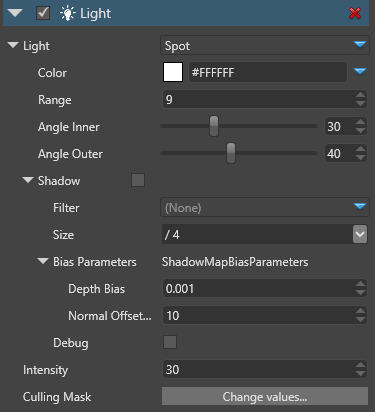
Properties
| Property | Description |
|---|---|
| Color | The color of the light (RGB) |
| Range | The range in world units. Beyond the this range, the light doesn't affect models. |
| Angle Inner | The inner angle of the spot cone where the light intensity influence is at one |
| Angle Outer | The outer angle of the spot cone where the light intensity influence is zero |
| Shadows | If enabled, the light casts shadows Filter: Produces soft shadows instead of hard shadows via PCF (Percentage Closer Filtering) Size: The size of texture to use for shadowing mapping. Larger textures produce better shadows edges, but are much more costly. For more information, see Shadows For spot lights, the default value is medium, as a spot light has usually a medium visual impact |
| Bias Parameters | These parameters are used to avoid some artifacts of the shadow map technique. Depth Bias: The amount of depth to add to the sampling depth to avoid shadow acne Normal Offset Scale: A factor multiplied by the depth bias toward the normal |
| Intensity | The intensity of the light. The color is multiplied by this value before being sent to the shader. Note: negative values produce darkness and have unpredictable effects |
| Culling Mask | Defines which entity groups are affected by this light. By default, all groups are affected |