


Figure 1.1 shows an overview of the security infrastructure that is used across the container and is accessible to all bundles deployed in the container. This common security infrastructure currently consists of a mechanism for making JAAS realms (or login modules) available to all application bundles. Other aspects of security are currently implemented separately in each of the Fuse ESB component products (Fuse Message Broker, Fuse Mediation Router, and Apache CXF).
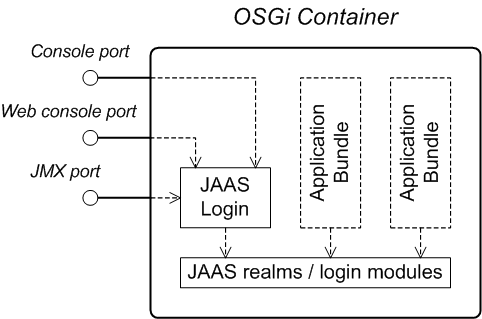
A JAAS realm or login module is a plug-in module that provides authentication and authorization data to Java applications, as defined by the Java Authentication and Authorization Service (JAAS) specification.
Fuse ESB supports a special mechanism for defining JAAS login modules (in either a Spring or a blueprint file), which makes the login module accessible to all bundles in the container. This makes it easy for multiple applications running in the OSGi container to consolidate their security data into a single JAAS realm.
The OSGi container has a predefined JAAS realm, the karaf realm.
Fuse ESB uses the karaf realm to provide authentication for remote
administration of the OSGi runtime, for the Web Console, and for JMX management.
The karaf realm uses a simple file-based repository, where
authentication data is stored in the
InstallDir/etc/users.properties
You can use the karaf realm in your own applications. Simply
configure karaf as the name of the JAAS realm that you want to use.
Your application then performs authentication using the data from the
users.properties file.
You can administer the OSGi container remotely either by connecting to the
console port with a Karaf client or using the Karaf ssh:ssh command
(see Using Remote and Child Instances of the Runtime in Configuring and Running Fuse ESB). The console
port is secured by a JAAS login feature that connects to the karaf
realm. Users that try to connect to the console port will be prompted to enter a
username and password that must match one of the accounts from the
karaf realm.
You can manage the OSGi container by connecting to the JMX port (for example,
using Java's JConsole). The JMX port is also secured by a JAAS login feature
that connects to the karaf realm.
Any application bundles that you deploy into the OSGi container can access the container's JAAS realms. The application bundle simply references one of the existing JAAS realms by name (which corresponds to an instance of a JAAS login module).
It is essential, however, that the JAAS realms are defined using the OSGi container's own login configuration mechanism—by default, Java provides a simple file-based login configuration implementation, but you cannot use this implementation in the context of the OSGi container.
 |  |  |
 |

