

|
|
|
The Lock Detail Display screen pops up when you select the Examine menu item from the Lock List Display screen. This screen contains the individual locks for the selected lock list or all locks for all lock lists.
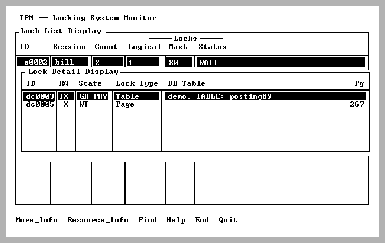
Database and table names are shown for table and page type locks. If a database cannot be opened or if IPM is running in stand-alone mode (-s flag), the table ID is displayed instead of the table name. The table is identified by the reltid and reltidx values in the iirelation catalog.
If this screen is displaying the locks for a particular lock list, IPM displays locks in the order in which they were acquired by the session to which the lock list belongs.
The Lock Detail Display has the following fields:
Internal lock ID
Mode in which the lock was requested. For possible values, see Mode Values.
Current state of the lock:
This column scrolls, so additional information can be displayed to the right of the visible part. Use the arrow keys to scroll the column.
Type of resource. For a list of resource types, see Resource Type.
The resource key on which this lock is held. Typically a database name, table name, and page on which this lock is held, but format can vary depending on the Lock Type. The values are justified and formatted for ease of reading.
|
|
|
The menu items on the Lock Detail Display screen are:
Place the cursor on the desired lock and select this menu item. Additional information for that lock is displayed on a pop-up screen.
For more information on this screen, see Lock Detail Display More_Info Screen.
All locks for the resource on which the cursor rests are displayed on the Resource Lock Display screen, providing useful information about the number of other sessions that have a lock on that resource. For example, you can see what other locks are held for page 0 in table foo. Other information displayed includes the session name (if any).
For more information on this screen, see Resource Lock Display Screen.
Searches a column in a scrolling region (tablefield). If searching a text column, Find locates all occurrences wherever they are in the column. To locate the next occurrence of your previous search, enter (.).
Displays help screens
Returns to the Lock List Display screen
Exits IPM
|
|
|
When the More_Info menu item is selected from the Examine submenu, a pop-up containing additional fields for the specified lock is displayed.
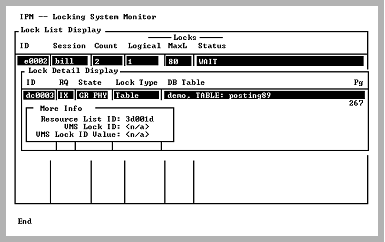
The additional fields are described in the following table.
The Internal Resource block identifier to which this lock belongs
The distributed lock ID assigned to this Ingres lock.
Appears on VMS and UNIX cluster installations only.
The value contained in the VMS lock assigned to this Ingres lock.
Appears on VMS and UNIX cluster installations only.