

|
|
|
The Lock List Display screen appears when you select Locks from the Lock Info Menu screen.
This screen displays all lock lists for current user transactions in the Ingres locking system on the current machine for the current installation. Lock lists that belong to user transactions also have an associated session name displayed.
It is useful to view locks by lock list to see what transactions are currently active. Use this screen to locate transactions that cannot proceed because they are blocked by another transaction.
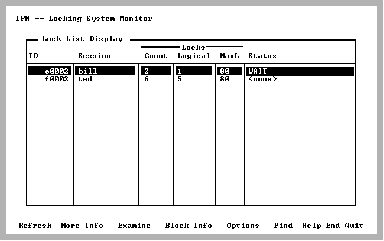
This screen contains an entry for each lock, as shown in this example:
System lock lists (NONPROTECT) are not displayed unless the "Display system locklists" option is set or the -e flag is specified on the command line.
VMS: If the status is ENQWAIT, the lock list in question is waiting for a resource locked by another Ingres user on another node in the VMS cluster. In this case, invoke IPM on the other nodes and search for a lock list holding locks on the resource in contention.
To view the locks for a given lock list, select the Examine menu item. The submenu that appears displays all locks for a particular lock list.
By selecting the Options menu item, you can change the IPM options. The only option that affects this screen is the Display empty locklists option. If any options were changed for lock lists or resources, select the Refresh menu item. For more information, see Option Selection Screen. 
|
|
|
Each transaction is represented in the Lock List Display screen by a lock list. The session name (if any) is also displayed.
To find waiting lock lists
The Find prompt appears.
If there are any lock lists with blocked locks, place the cursor on that lock list.
|
|
|
The Lock List Display has the following columns:
Internal lock list identifier.
The name of the session or <none>. Only lock lists belonging to user transactions have session names.
The total number of locks on the list currently.
The number of logical locks on the list currently.
The total number of logical locks allowed on this list. For user transactions, this is the maximum number of locks per lock list. Some internal lock lists that contain physical locks exceed this number.
State of the lock list when the locking information was obtained. Values include:
Waiting for a lock. This indicates a blocked lock. Use the Block_Info menu item to find the blocking lock.
Can be released without going through recovery (system lock lists only).
Lock list remaining without transaction.
Waiting on a system event.
Lock list taken over by the recovery process.
Lock list owned by the recovery process.
Lock list set on wait queue for event.
Event that the lock list is waiting on is done.
Lock requests on this list are non-interruptible.
The following statuses apply only on VMS cluster installations:
Waiting for VMS lock request.
Global deadlock search in progress.
Lock requests are stalled for node failure recovery.
|
|
|
The Lock List Display has the following menu items:
Queries the Ingres locking system for locking information. Lock List and Resource information are obtained together to ensure a consistent snapshot of the locking system. After setting IPM Options, select this menu item so the locking information reflects the current options. For more information, see Option Selection Screen.
Displays a pop-up screen with additional information on the selected lock list.
For more information on this pop-up screen, see Lock List Display More_Info Screen.
Displays the Lock Detail Display screen, which displays all locks in the selected lock list. If table names must be retrieved, a delay may occur because a database must be opened.
For more information on this screen, see Lock Detail Display Screen.
Displays the Blocking Lock Display screen if the selected lock list contains a lock that cannot be granted. The lock that is blocking a lock in the current lock list is displayed, as well as all other locks on that given resource.
For more information, see Blocking Lock Display Screen.
If this menu item is selected and the current lock list does not have any locks waiting (to be granted), a pop-up message to that effect is displayed.
Displays the Option Selection screen. The current option settings are displayed. Various options can be modified and saved.
Searches a column in a scrolling region (tablefield). If searching a text column, Find locates all occurrences in the column. To locate the next occurrence of your previous search, enter (.).
Displays help screens.
Returns to the Lock Info Menu screen.
Exits IPM.
|
|
|
When the More_Info menu item is selected from the Lock List Display, a pop-up containing additional fields for the specified lock list is displayed.
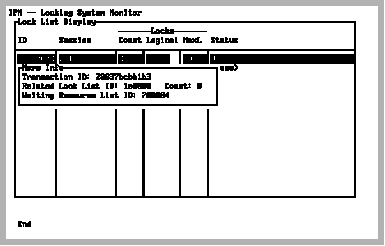
The additional fields are:
Transaction identifier associated with this lock list. This value corresponds to the External TX ID column on the Log Transaction Display screen. For more information, see Log Transaction Display Screen.
Related lock list identifier, if not a transaction lock list
Number of related lock list identifiers that this lock list must assure are released before this lock list can be released
Internal resource block identifier of the lock that is currently blocked