

|
|
|
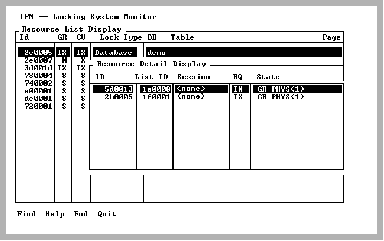
The Resource Detail Display screen pops up when you select the Examine menu item from the Resource List Display screen. This screen displays all the locks held on the specified resource.
The number of locks held on a resource indicates the amount of concurrent activity and points to potential concurrency bottlenecks.
|
|
|
The Resource Detail Display has the following information:
The internal lock identifier for this lock
The internal lock list identifier to which this lock belongs
The name of the session to which this lock belongs
The mode in which this lock was requested. For a list of possible modes, see Mode Values.
The current state of the lock:
|
|
|
The Resource Detail Display has the following menu items:
Searches any column in the scrolling area. To initiate the search, tab to the desired column and select Find. If you are searching a text column, Find locates all occurrences in the column.
Displays help screens.
Returns to the Resource List Display screen.
Exits IPM.