

This chapter discusses the IPM screens that display log information.
|
|
|
Log information displayed by IPM includes log summary information, header information, log processes, transactions, and databases. You can use the information for logging system analysis and tuning, and for determining if the log file size is adequate. Other logging system parameters set at installation or configuration time can be compared against the Logging System Summary screen to see if they are sufficient.
To review log information, select the Log_Info screen from the Main Menu.
|
|
|
The Log Info Menu screen appears when you select Log_Info from the Main Menu. This screen is the top-level screen for IPM monitoring of the Ingres logging system.
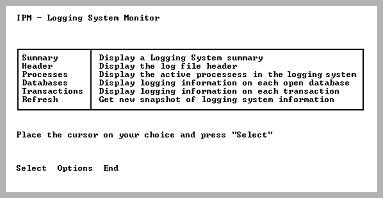
The Log Info menu has the following selections:
Displays the Logging System Summary screen. Information on the logging system is displayed (transactions started and finished, Log I/Os, and other data).
For more information on this screen, see Logging System Summary Screen.
Displays the Logging System Header screen. Information shown includes force abort and log full points and a diagram showing log file usage and percent full.
For more information on this screen, see Logging System Header Screen.
Displays the Log Process Display screen. This screen contains a list of all processes in the Ingres installation (Ingres DBMS Server(s) and archiver and recovery processes).
For more information on this screen, see Log Process Display Screen.
Displays the Log Database Display screen. This screen contains a list of all databases currently in the logging system.
For more information on this screen, see Log Database Display Screen.
Displays the Log Transaction Display screen. This screen contains a list of all transactions currently in the logging system.
For more information on this screen, see Log Transaction Display Screen.
Queries the logging system for logging information. Process, database, and transaction information are obtained together to ensure a consistent snapshot of the logging system.
|
|
|
The Log Info menu screen contains the following menu items:
Selects the item on which the cursor is resting.
Displays the Option Selection screen. The current option settings are displayed. They can be modified and saved.
For more information on this screen, see Option Selection Screen.
Returns to the Main Menu.