

|
|
|
The Lock Info Menu screen appears when you select Lock_Info from the Main Menu.
This screen is the top-level screen for IPM monitoring of the Ingres locking system.
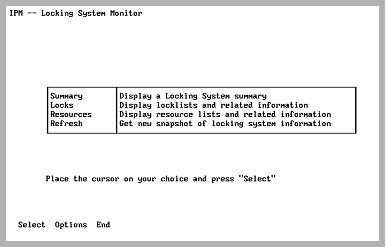
From this screen, you can select various locking system parameters for monitoring, including a snapshot of the locking system. You may experience a delay as the system displays locking system parameters.
The options specified at IPM startup can be viewed on the Options selection screen. To specify the information that is obtained from the locking system, see Option Selection Screen.
|
|
|
The Lock_Info screen has the following selections:
Displays the Locking System Summary screen. Information on the locking system is displayed (lock list activity, deadlock counts, and other data).
For more information on this screen, see Locking System Summary Screen.
Displays the Lock List Display screen. All lock lists in the locking system that meet the appropriate option selections are displayed.
For more information on this screen, see Lock List Display Screen.
Displays the Resource List Display screen. All resources of interest that have locks on them are displayed. The resources displayed depend on the setting of IPM options.
For more information on this screen, see Resource Lock Display Screen.
Queries the locking system for locking information. Lock List and Resource information are obtained together to ensure a consistent snapshot of the locking system. After setting IPM options, select this menu item so the locking information reflects the set options.
For more information, see Option Selection Screen.
|
|
|
The Lock Info Menu has the following menu items:
Selects the item on which the cursor is resting.
Displays the Option Selection screen. The current option settings are displayed. They can be modified and saved. If any options for lock lists or resources were changed, select the Refresh menu item.
For more information on this, see Option Selection Screen.
Returns to the Main Menu screen.