

|
|
|
The Log Database Display screen appears when you select Databases from the Log Info Menu screen.
This screen can be used to monitor logging activity by database.
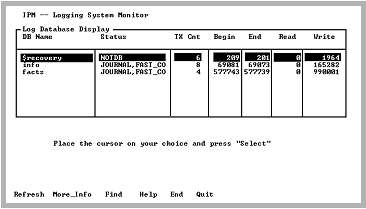
The screen contains an entry for each active database. Information includes the number of transaction begins and ends, and the number of log file write requests. The status of a database can also be determined. For a list of valid status values, see Logging System Header Screen Status Field Values.
The Log Database Display shows the following information:
The database name.
The database status. Valid values are as follows:
Online backup for this database is about to start.
This database is about to be closed; the last user in the database is exiting.
Online backup
This database is running with Fast Commit.
Online backup
This database has journaling enabled.
The entry is not a database.
This database is about to be opened for the first user of the database.
This database is closed and the archiver is archiving transactions.
The number of currently open transactions. This is the difference between the Begin and End columns.
The number of transaction begins that have occurred so far.
The number of transaction ends that have occurred so far.
The number of log file read requests that have been made so far. It is unusual for this value to be greater than 0 for any entry except the $recovery entry. Log file reads are usually done during transaction rollout and during journaling by the archiver.
The number of log file write requests made.
|
|
|
The Log Database Display has the following menu items:
Queries the logging system for logging information. Process, database and transaction information are obtained together to ensure a consistent snapshot of the logging system.
Displays additional information for the selected database, including the database location and journal window. For more information on this screen, see Log Database Display More_Info Screen.
Searches any column in the scrolling area. To initiate the search, tab to the desired column and select Find. If you are searching a text column, Find locates all occurrences in the column.
Displays help screens.
Returns to the Log Info Menu screen.
Exits IPM.
|
|
|
When the More_Info menu item is selected from the Log Database Display screen, a pop-up screen containing additional fields for the specified database is displayed.
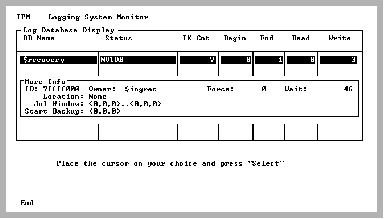
The pop-up screen has the following fields:
The internal database ID for this database
The DBA for this database
The number of times log file forces occurred for this database
The number of times transactions in this database had to wait to use the logging system
The database location
The range of log file addresses where there are transactions for this database that must be journaled. This field implies that journaling is enabled for this database.
The log file address where on-line backup for this database begins