


This section describes how the Open vSwitch plug-in implements the OpenStack Networking abstractions.
This example uses VLAN isolation on the switches to isolate tenant networks. This
configuration labels the physical network associated with the public network as
physnet1, and the physical network associated with the data
network as physnet2, which leads to the following configuration
options in
ovs_neutron_plugin.ini:
[ovs]
tenant_network_type = vlan
network_vlan_ranges = physnet2:100:110
integration_bridge = br-int
bridge_mappings = physnet2:br-eth1
The first scenario has two private networks (net01, and
net02), each with one subnet
(net01_subnet01: 192.168.101.0/24,
net02_subnet01, 192.168.102.0/24). Both private networks are
attached to a router that connects them to the public network (10.64.201.0/24).

Under the service tenant, create the shared router, define the
public network, and set it as the default gateway of the
router
$ tenant=$(keystone tenant-list | awk '/service/ {print $2}')
$ neutron router-create router01
$ neutron net-create --tenant-id $tenant public01 \
          --provider:network_type flat \
          --provider:physical_network physnet1 \
          --router:external=True
$ neutron subnet-create --tenant-id $tenant --name public01_subnet01 \
          --gateway 10.64.201.254 public01 10.64.201.0/24 --disable-dhcp
$ neutron router-gateway-set router01 public01
Under the demo user tenant, create the private network
net01 and corresponding subnet, and connect it to the
router01 router. Configure it to use VLAN ID 101 on the
physical
switch.
$ tenant=$(keystone tenant-list|awk '/demo/ {print $2}'
$ neutron net-create --tenant-id $tenant net01 \
          --provider:network_type vlan \
          --provider:physical_network physnet2 \
          --provider:segmentation_id 101
$ neutron subnet-create --tenant-id $tenant --name net01_subnet01 net01 192.168.101.0/24
$ neutron router-interface-add router01 net01_subnet01
Similarly, for net02, using VLAN ID 102 on the physical
switch:
$ neutron net-create --tenant-id $tenant net02 \
          --provider:network_type vlan \
          --provider:physical_network physnet2 \
          --provider:segmentation_id 102
$ neutron subnet-create --tenant-id $tenant --name net02_subnet01 net02 192.168.102.0/24
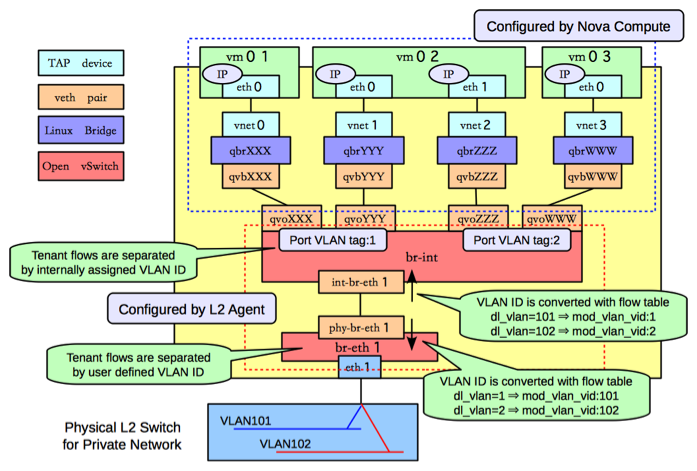
$ neutron router-interface-add router01 net02_subnet01The following figure shows how to configure various Linux networking devices on the compute host:
![[Note]](../common/images/admon/note.png) | Note |
|---|---|
There are four distinct type of virtual networking devices: TAP devices,
veth pairs, Linux bridges, and Open vSwitch bridges. For an ethernet frame to travel
from |
A TAP device, such as vnet0
is how hypervisors such as KVM and Xen implement a virtual network interface card
(typically called a VIF or vNIC). An ethernet frame sent to a TAP device is received
by the guest operating system.
A veth pair is a pair of virtual network interfaces correctly directly together. An ethernet frame sent to one end of a veth pair is received by the other end of a veth pair. OpenStack networking makes use of veth pairs as virtual patch cables in order to make connections between virtual bridges.
A Linux bridge behaves like a hub: you can connect multiple (physical or virtual) network interfaces devices to a Linux bridge. Any ethernet frames that come in from one interface attached to the bridge is transmitted to all of the other devices.
An Open vSwitch bridge behaves like a virtual switch: network interface devices connect to Open vSwitch bridge's ports, and the ports can be configured much like a physical switch's ports, including VLAN configurations.
The br-int OpenvSwitch bridge is the integration bridge: all of
the guests running on the compute host connect to this bridge. OpenStack Networking
implements isolation across these guests by configuring the
br-int ports.
The br-eth1 bridge provides connectivity to the physical
network interface card, eth1. It connects to the integration
bridge by a veth pair: (int-br-eth1, phy-br-eth1).
In this example, net01 and net02 have VLAN ids of 1 and 2, respectively. However,
the physical network in our example only supports VLAN IDs in the range 101 through 110. The
Open vSwitch agent is responsible for configuring flow rules on
br-int and br-eth1 to do VLAN translation.
When br-eth1 receives a frame marked with VLAN ID 1 on the port
associated with phy-br-eth1, it modifies the VLAN ID in the frame
to 101. Similarly, when br-int receives a frame marked with VLAN ID 101 on the port
associated with int-br-eth1, it modifies the VLAN ID in the frame
to 1.
Ideally, the TAP device vnet0 would be connected directly to
the integration bridge, br-int. Unfortunately, this isn't
possible because of how OpenStack security groups are currently implemented.
OpenStack uses iptables rules on the TAP devices such as vnet0 to
implement security groups, and Open vSwitch is not compatible with iptables rules
that are applied directly on TAP devices that are connected to an Open vSwitch
port.
OpenStack Networking uses an extra Linux bridge and a veth pair as a workaround for
this issue. Instead of connecting vnet0 to an Open vSwitch
bridge, it is connected to a Linux bridge,
qbr. This bridge is
connected to the integration bridge, XXXbr-int, through the
(qvb veth pair.XXX,
qvoXXX)
The network host runs the neutron-openvswitch-plugin-agent, the neutron-dhcp-agent, neutron-l3-agent, and neutron-metadata-agent services.
On the network host, assume that eth0 is connected to the external network, and
eth1 is connected to the data network, which leads to the following configuration
in the
ovs_neutron_plugin.ini file:
[ovs]
tenant_network_type = vlan
network_vlan_ranges = physnet2:101:110
integration_bridge = br-int
bridge_mappings = physnet1:br-ex,physnet2:br-eth1
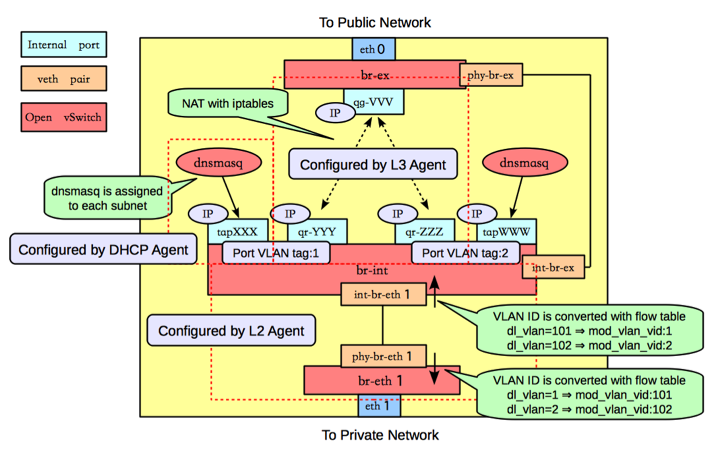
The following figure shows the network devices on the network host:
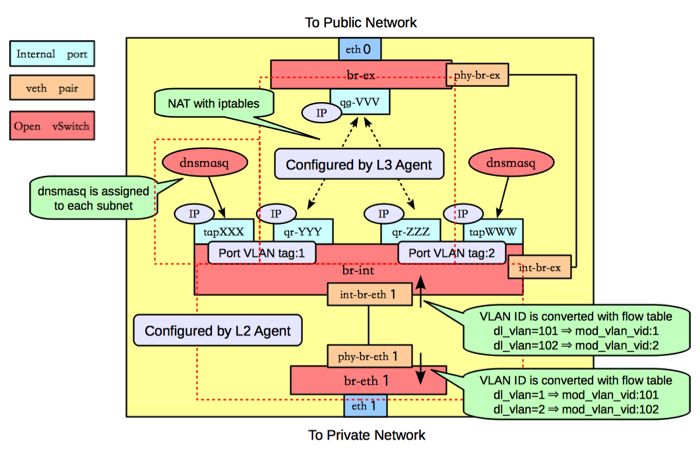
As on the compute host, there is an Open vSwitch integration bridge
(br-int) and an Open vSwitch bridge connected to the data
network (br-eth1), and the two are connected by a veth pair, and
the neutron-openvswitch-plugin-agent configures the ports on both switches to do
VLAN translation.
An additional Open vSwitch bridge, br-ex,
connects to the physical interface that is connected to the external network. In
this example, that physical interface is eth0.
| Note |
|---|---|
While the integration bridge and the external bridge are connected by
a veth pair |
The network host uses Open vSwitch internal
ports. Internal ports enable you to assign one
or more IP addresses to an Open vSwitch bridge. In previous example, the
br-int bridge has four internal
ports: tap,
XXXqr-,
YYYqr-,
ZZZtap. Each internal port has
a separate IP address associated with it. An internal port,
WWWqg-VVV, is on the br-ex bridge.
By default, The OpenStack Networking DHCP agent uses a program called dnsmasq
to provide DHCP services to guests. OpenStack Networking must create an internal
port for each network that requires DHCP services and attach a dnsmasq process to
that port. In the previous example, the interface
tap is on subnet
XXXnet01_subnet01, and the interface
tap is on
WWWnet02_subnet01.
The OpenStack Networking L3 agent implements routing through the use of Open
vSwitch internal ports and relies on the network host to route the packets across
the interfaces. In this example: interfaceqr-YYY, which is on
subnet net01_subnet01, has an IP address of 192.168.101.1/24,
interface qr-, which is on subnet
ZZZnet02_subnet01, has an IP address of
192.168.102.1/24, and interface
qg-, which has an IP
address of VVV10.64.201.254/24. Because of each of these interfaces
is visible to the network host operating system, it will route the packets
appropriately across the interfaces, as long as an administrator has enabled IP
forwarding.
The L3 agent uses iptables to implement floating IPs to do the network address translation (NAT).
One problem with using the host to implement routing is that there is a chance
that one of the OpenStack Networking subnets might overlap with one of the physical
networks that the host uses. For example, if the management network is implemented
on eth2 (not shown in the previous example), by coincidence happens
to also be on the 192.168.101.0/24 subnet, then this will cause
routing problems because it is impossible ot determine whether a packet on this
subnet should be sent to qr-YYY or eth2. In
general, if end-users are permitted to create their own logical networks and
subnets, then the system must be designed to avoid the possibility of such
collisions.
OpenStack Networking uses Linux network namespaces to prevent collisions between the physical networks on the network host, and the logical networks used by the virtual machines. It also prevents collisions across different logical networks that are not routed to each other, as you will see in the next scenario.
A network namespace can be thought of as an isolated environment that has its own networking stack. A network namespace has its own network interfaces, routes, and iptables rules. You can think of like a chroot jail, except for networking instead of a file system. As an aside, LXC (Linux containers) use network namespaces to implement networking virtualization.
OpenStack Networking creates network namespaces on the network host in order to avoid subnet collisions.
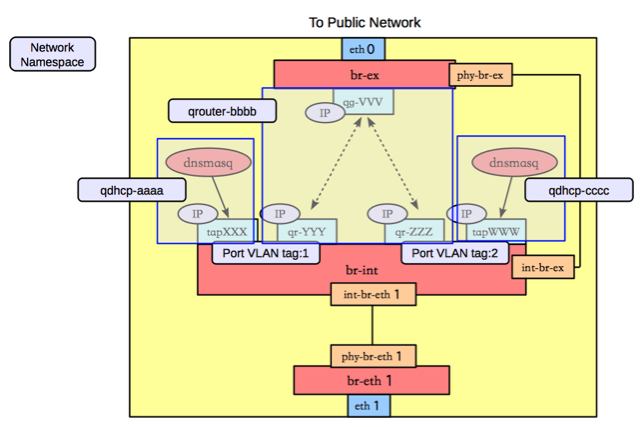
Tn this example, there are three network namespaces, as depicted in the following figure.
qdhcp-: contains theaaatapinterface and the dnsmasq process that listens on that interface, to provide DHCP services forXXXnet01_subnet01. This allows overlapping IPs betweennet01_subnet01and any other subnets on the network host.qrouter-: contains thebbbbqr-,YYYqr-, andZZZqg-interfaces, and the corresponding routes. This namespace implementsVVVrouter01in our example.qdhcp-: contains theccctapinterface and the dnsmasq process that listens on that interface, to provide DHCP services forWWWnet02_subnet01. This allows overlapping IPs betweennet02_subnet01and any other subnets on the network host.
In this scenario, tenant A and tenant B each have a network with one subnet and one router that connects the tenants to the public Internet.

Under the service tenant, define the public
network:
$ tenant=$(keystone tenant-list | awk '/service/ {print $2}')
$ neutron net-create --tenant-id $tenant public01 \
          --provider:network_type flat \
          --provider:physical_network physnet1 \
          --router:external=True
$ neutron subnet-create --tenant-id $tenant --name public01_subnet01 \
          --gateway 10.64.201.254 public01 10.64.201.0/24 --disable-dhcp
Under the tenantA user tenant, create the tenant router and set
its gateway for the public
network.
$ tenant=$(keystone tenant-list|awk '/tenantA/ {print $2}')
$ neutron router-create --tenant-id $tenant router01
$ neutron router-gateway-set router01 public01
Then, define private network net01 using VLAN ID 102 on the
physical switch, along with its subnet, and connect it to the router.
$ neutron net-create --tenant-id $tenant net01 \
          --provider:network_type vlan \
          --provider:physical_network physnet2 \
          --provider:segmentation_id 101
$ neutron subnet-create --tenant-id $tenant --name net01_subnet01 net01 192.168.101.0/24
$ neutron router-interface-add router01 net01_subnet01
Similarly, for tenantB, create a router and another network,
using VLAN ID 102 on the physical
switch:
$ tenant=$(keystone tenant-list|awk '/tenantB/ {print $2}')
$ neutron router-create --tenant-id $tenant router02
$ neutron router-gateway-set router02 public01
$ neutron net-create --tenant-id $tenant net02 \
          --provider:network_type vlan \
          --provider:physical_network physnet2 \
          --provider:segmentation_id 102
$ neutron subnet-create --tenant-id $tenant --name net02_subnet01 net01 192.168.101.0/24
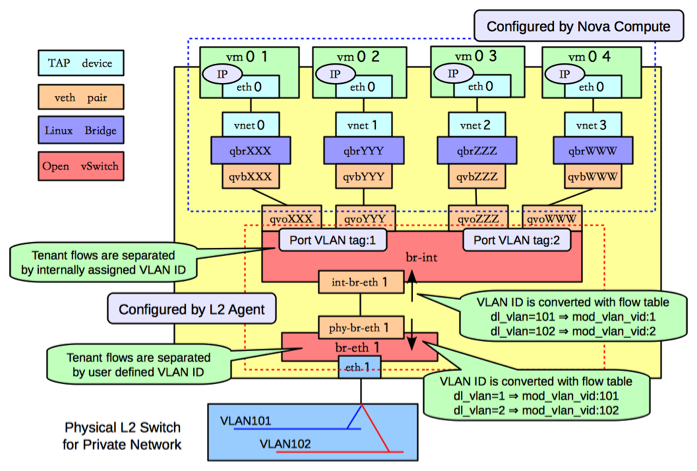
$ neutron router-interface-add router02 net02_subnet01The following figure shows how to configure Linux networking devices on the Compute host:
| Note |
|---|---|
The Compute host configuration resembles the configuration in scenario 1. However, in scenario 1, a guest connects to two subnets while in this scenario, the subnets belong to different tenants. |
The following figure shows the network devices on the network host for the second scenario.
In this configuration, the network namespaces are organized to isolate the two subnets from each other as shown in the following figure.
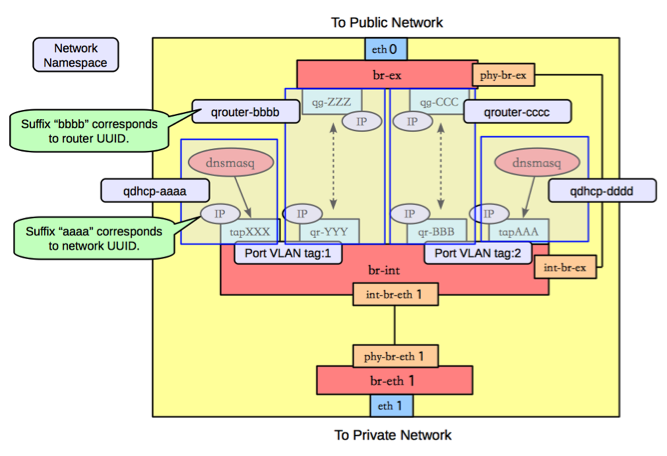
In this scenario, there are four network namespaces
(qhdcp-,
aaaqrouter-,
bbbbqrouter-, and
ccccqhdcp-), instead of three.
Since there is no connectivity between the two networks, and so each router is
implemented by a separate namespace.dddd
